7/20/2021

Setup Kafka with K8s + Develop KStream as Quarkus app + Run KStream app as docker-compose containers.


Setup Kafka with K8s


You can use either kubernetes or docker-compose to set up kafka. If you prefer docker-compose , you can skip this part.


Quickstarts


minikube start --memory=4096 # 2GB default memory isn't always enough


kubectl create namespace kafka


kubectl create -f 'https://strimzi.io/install/latest?namespace=kafka' -n kafka


# Apply the `Kafka` Cluster CR file
kubectl apply -f https://strimzi.io/examples/latest/kafka/kafka-persistent-single.yaml -n kafka 


kubectl wait kafka/my-cluster --for=condition=Ready --timeout=300s -n kafka

30463


kubectl -n kafka run kafka-producer -ti --image=quay.io/strimzi/kafka:0.24.0-kafka-2.8.0 --rm=true --restart=Never -- bin/kafka-console-producer.sh --broker-list my-cluster-kafka-bootstrap:9092 --topic my-topic 


test


kubectl -n kafka run kafka-consumer -ti --image=quay.io/strimzi/kafka:0.24.0-kafka-2.8.0 --rm=true --restart=Never -- bin/kafka-console-consumer.sh --bootstrap-server my-cluster-kafka-bootstrap:9092 --topic my-topic --from-beginning 


test


Make kafka access to external clients


Accessing Kafka: Part 2 - Node ports


dhanuka@dhanuka:~/research/kstream$ kubectl get svc -n kafka
NAME                                          TYPE            CLUSTER-IP      EXTERNAL-IP   PORT(S)                                                      AGE
my-cluster-kafka-bootstrap           ClusterIP       10.111.159.36           <none>            9091/TCP,9092/TCP,9093/TCP                    11m
my-cluster-kafka-brokers              ClusterIP       None                        <none>            9090/TCP,9091/TCP,9092/TCP,9093/TCP   11m
my-cluster-zookeeper-client          ClusterIP       10.101.2.229            <none>            2181/TCP                                                      12m
my-cluster-zookeeper-nodes          ClusterIP       None                        <none>            2181/TCP,2888/TCP,3888/TCP                    12m


minikube tunnel


dhanuka@dhanuka:~/research/kstream$ kubectl edit  kafka - kafka
kafka.kafka.strimzi.io/my-cluster edited


dhanuka@dhanuka:~/research/kstream$ kubectl get svc -n kafka
NAME                                  TYPE        CLUSTER-IP       EXTERNAL-IP   PORT(S)                               AGE
my-cluster-kafka-0                 NodePort   10.103.130.70    <none>        9094:30472/TCP                                    5m42s
my-cluster-kafka-bootstrap    ClusterIP   10.111.159.36    <none>        9091/TCP,9092/TCP,9093/TCP                26m
my-cluster-kafka-brokers       ClusterIP   None             <none>        9090/TCP,9091/TCP,9092/TCP,9093/TCP   26m
my-cluster-kafka-external-bootstrap   NodePort    10.106.140.141   <none>    9094:30463/TCP                                        5m42s
my-cluster-zookeeper-client   ClusterIP   10.101.2.229     <none>        2181/TCP                              27m
my-cluster-zookeeper-nodes    ClusterIP   None             <none>        2181/TCP,2888/TCP,3888/TCP                 27m


dhanuka@dhanuka:~/research/kstream$ kubectl get service my-cluster-kafka-external-bootstrap -o=jsonpath='{.spec.ports[0].nodePort}{"\n"}' -n kafka


30463


dhanuka@dhanuka:~/research/kstream$ kubectl get node dev  -o=jsonpath='{range .status.addresses[*]}{.type}{"\t"}{.address}{"\n"}'

InternalIP 192.168.99.100

Hostname dev


Create and deploy KStream


Using Apache Kafka Streams


git clone https://github.com/quarkusio/quarkus-quickstarts.git


Change bootstrap server IP and Port

kafka-streams-quickstart/producer/src/main/resources/application.properties


IP : minikube ip

Port: my-cluster-kafka-external-bootstrap   NodePort    30463/TCP


./mvnw clean package -f producer/pom.xml

./mvnw clean package -f aggregator/pom.xml


Change docker-compose.yml file as below by removing kafka cluster related stuff.


Change bootstrap server IP and Port as done above


version: '3.5'

services:
  producer:
    image: quarkus-quickstarts/kafka-streams-producer:1.0
    build:
      context: producer
      dockerfile: src/main/docker/Dockerfile.${QUARKUS_MODE:-jvm}
    environment:
      KAFKA_BOOTSTRAP_SERVERS: 192.168.99.100:30463
    networks:
      - kafkastreams-network

  aggregator:
    image: quarkus-quickstarts/kafka-streams-aggregator:1.0
    build:
      context: aggregator
      dockerfile: src/main/docker/Dockerfile.${QUARKUS_MODE:-jvm}
    environment:
      QUARKUS_KAFKA_STREAMS_BOOTSTRAP_SERVERS: 192.168.99.100:30463
    networks:
      - kafkastreams-network

networks:
  kafkastreams-network:
    name: ks


docker-compose up --build


docker run --tty --rm -i --network ks debezium/tooling:1.1


kafkacat -b kafka:9092 -C -o beginning -q -t temperatures-aggregated

{"avg":34.7,"count":4,"max":49.4,"min":16.8,"stationId":9,"stationName":"Marrakesh","sum":138.8}
{"avg":15.7,"count":1,"max":15.7,"min":15.7,"stationId":2,"stationName":"Snowdonia","sum":15.7}
{"avg":12.8,"count":7,"max":25.5,"min":-13.8,"stationId":7,"stationName":"Porthsmouth","sum":89.7}
...


Troubleshoot Docker stop


If you face issue like below when stopping aggregator and producer follow steps in this link


Docker kill command

Solved: cannot kill Docker container - permission denied


root@dhanuka:kstream/quarkus-quickstarts/kafka-streams-quickstart# sudo aa-remove-unknown
Removing 'docker-default'
root@dhanuka:kafka-streams-quickstart# docker container kill 8d7241b9395b
8d7241b9395b
root@dhanuka:kafka-streams-quickstart# docker container kill ae15dd30bc7c
ae15dd30bc7c


GitOps using ArgoCD and Tekton

Inspired by: 

ricoberger/gitops-using-argo-cd-and-tekton: GitOps using Argo CD and Tekton


# For and clone below repo


git clone https://github.com/ricoberger/gitops-using-argo-cd-and-tekton

cd  gitops-using-argo-cd-and-tekton

git checkout -b dev

cd  clusters/apps

find ./ -type f -exec sed -i 's/ricoberger/github_username/g' {} \;

cd ../../


git  add .
git commit -m "change username of github"

git  push origin dev

minikube start --driver=virtualbox --cpus=4 --memory=8192m --profile=dev

minikube addons enable ingress --profile=dev


kustomize build clusters/argocd/dev | kubectl apply -f -


kubectl get pods -n argocd


# once all the pods up and running


kubectl apply -f clusters/apps/dev.yaml


#Now we have to add our Ingresses to the /etc/hosts file:


sudo echo "`minikube ip --profile=dev` argocd-dev.fake grafana-dev.fake prometheus-dev.fake tekton-dev.fake server-dev.fake" | sudo tee -a /etc/hosts


# Argocd admin password


kubectl get pods -n argocd -l app.kubernetes.io/name=argocd-server -o name | cut -d'/' -f 2


# Create secrets for github and docker hub


kubectl create secret docker-registry docker-registry-secret -n tekton-pipelines --docker-server="https://index.docker.io/v1/" --docker-username=<DOCKER_USERNAME> --docker-password=<DOCKER_PASSWORD>


kubectl annotate secret docker-registry-secret tekton.dev/docker-0=https://index.docker.io/v1/   -n tekton-pipelines


kubectl create secret generic github-secret --type="kubernetes.io/basic-auth" --from-literal=username=<GITHUB_USERNAME> --from-literal=password=<GITHUB_PASSWORD>  -n tekton-pipelines


kubectl annotate secret github-secret tekton.dev/git-0=https://github.com

-n tekton-pipelines


cat <<EOF | kubectl create -n tekton-pipelines -f -

apiVersion: tekton.dev/v1beta1

kind: PipelineRun

metadata:

  name: build-and-deploy-prod-17

  namespace: tekton-pipelines

  annotations:

    argocd.argoproj.io/compare-options: IgnoreExtraneous

spec:

  pipelineRef:

    name: build-and-deploy-pipeline

  params:

    - name: gitUrl

      value: https://github.com/<GITHUB_USERNAME>/gitops-using-argo-cd-and-tekton

    - name: gitRevision

      value: dev

    - name: imageUrl

      value: <DOCKER_USERNAME>/gitops-using-argo-cd-and-tekton

    - name: serviceName

      value: server

    - name: filePath

      value: clusters/server/dev/server-deploy.yaml

    - name: yamlField

      value: spec.template.spec.containers[0].image

  serviceAccountName: pipeline-account

  workspaces:

    - name: git-source

      persistentVolumeClaim:

        claimName: git-source-pvc

EOF


Troubleshooting

  1. Change default branch to dev


  1. Fix yq expression


 vi clusters/tekton/base/pipeline.yaml


vi clusters/tekton/base/pipeline-task-update-image.yaml


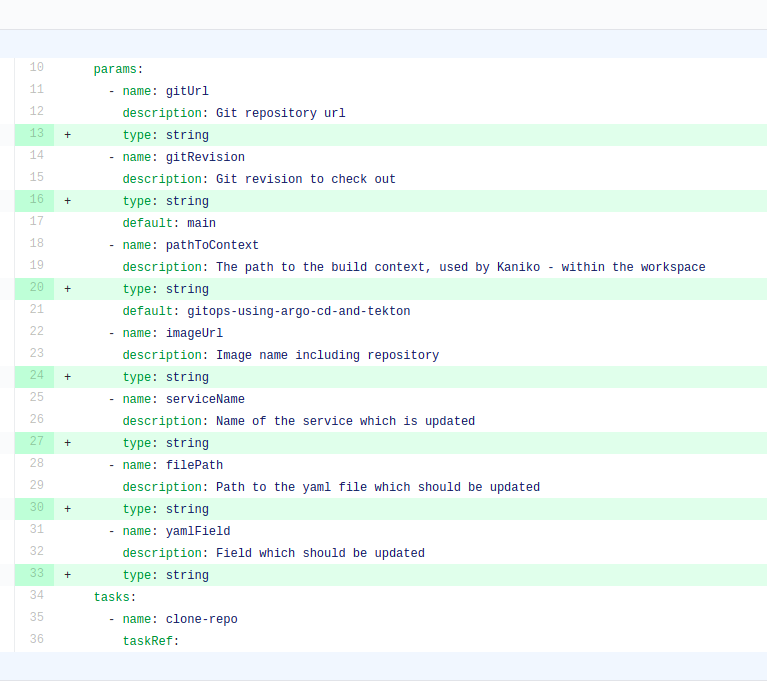
  1. Fix parameter type missing


 vi clusters/tekton/base/pipeline.yaml


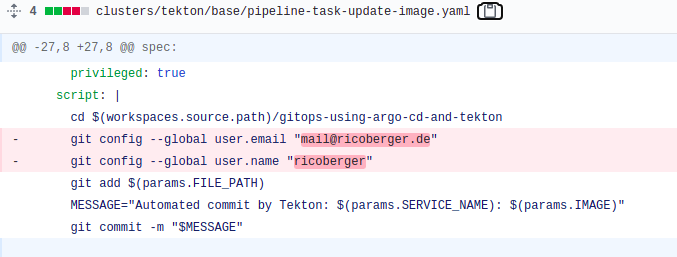
  1. Update github username and email

vi clusters/tekton/base/pipeline-task-update-image.yaml


References:


Argo Workflows and Pipelines - CI/CD, Machine Learning, and Other Kubernetes Workflows


What is GitOps, How GitOps works and Why it's so useful


https://medium.com/dzerolabs/installing-ambassador-argocd-and-tekton-on-kubernetes-540aacc983b9


https://itnext.io/argocd-a-helm-chart-deployment-and-working-with-helm-secrets-via-aws-kms-96509bfc5eb3


https://itnext.io/kubernetes-essential-tools-2021-def12e84c572