7/13/2018

JVM Heap Memory Allocation : G1 vs CMS


People misunderstand about how G1 GC collector memory allocate at JVM boot up. We normally configure max and min values for heap but for G1 GC collector, no need to configure min value. Let's try out two scenarios and have a look at the observations.

G1 GC Collector

ps -ef | grep java
uranadh   4645 4639 16 19:46 ?        00:01:02 /usr/bin/java -Dosgi.requiredJavaVersion=1.8 -XX:+UseG1GC -XX:+UseStringDeduplication -Dosgi.requiredJavaVersion=1.8 -Xms5000m -Xmx5000m -jar /home/uranadh/software/eclipse//plugins/org.eclipse.equinox.launcher_1.3.201.v20161025-1711.jar -os linux -ws gtk -arch x86_64 -showsplash /home/uranadh/software/eclipse//plugins/org.eclipse.platform_4.6.3.v20170301-0400/splash.bmp -launcher /home/uranadh/software/eclipse/eclipse -name Eclipse --launcher.library /home/uranadh/software/eclipse//plugins/org.eclipse.equinox.launcher.gtk.linux.x86_64_1.1.401.v20161122-1740/eclipse_1618.so -startup /home/uranadh/software/eclipse//plugins/org.eclipse.equinox.launcher_1.3.201.v20161025-1711.jar --launcher.appendVmargs -exitdata 240005 -product org.eclipse.epp.package.jee.product -vm /usr/bin/java -vmargs -Dosgi.requiredJavaVersion=1.8 -XX:+UseG1GC -XX:+UseStringDeduplication -Dosgi.requiredJavaVersion=1.8 -Xms5000m -Xmx5000m -jar /home/uranadh/software/eclipse//plugins/org.eclipse.equinox.launcher_1.3.201.v20161025-1711.jar
uranadh   4792 4787 33 19:48 ?        00:01:20 /usr/bin/java -Dosgi.requiredJavaVersion=1.8 -XX:+UseG1GC -XX:+UseStringDeduplication -Dosgi.requiredJavaVersion=1.8 -Xms10000m -Xmx10000m -jar /home/uranadh/software/eclipse//plugins/org.eclipse.equinox.launcher_1.3.201.v20161025-1711.jar -os linux -ws gtk -arch x86_64 -showsplash /home/uranadh/software/eclipse//plugins/org.eclipse.platform_4.6.3.v20170301-0400/splash.bmp -launcher /home/uranadh/software/eclipse/eclipse -name Eclipse --launcher.library /home/uranadh/software/eclipse//plugins/org.eclipse.equinox.launcher.gtk.linux.x86_64_1.1.401.v20161122-1740/eclipse_1618.so -startup /home/uranadh/software/eclipse//plugins/org.eclipse.equinox.launcher_1.3.201.v20161025-1711.jar --launcher.appendVmargs -exitdata 28800f -product org.eclipse.epp.package.jee.product -vm /usr/bin/java -vmargs -Dosgi.requiredJavaVersion=1.8 -XX:+UseG1GC -XX:+UseStringDeduplication -Dosgi.requiredJavaVersion=1.8 -Xms10000m -Xmx10000m -jar /home/uranadh/software/eclipse//plugins/org.eclipse.equinox.launcher_1.3.201.v20161025-1711.jar
uranadh   4938 4932 99 19:51 ?        00:01:21 /usr/bin/java -Dosgi.requiredJavaVersion=1.8 -XX:+UseG1GC -XX:+UseStringDeduplication -Dosgi.requiredJavaVersion=1.8 -Xms10000m -Xmx10000m -jar /home/uranadh/software/eclipse//plugins/org.eclipse.equinox.launcher_1.3.201.v20161025-1711.jar -os linux -ws gtk -arch x86_64 -showsplash /home/uranadh/software/eclipse//plugins/org.eclipse.platform_4.6.3.v20170301-0400/splash.bmp -launcher /home/uranadh/software/eclipse/eclipse -name Eclipse --launcher.library /home/uranadh/software/eclipse//plugins/org.eclipse.equinox.launcher.gtk.linux.x86_64_1.1.401.v20161122-1740/eclipse_1618.so -startup /home/uranadh/software/eclipse//plugins/org.eclipse.equinox.launcher_1.3.201.v20161025-1711.jar --launcher.appendVmargs -exitdata 2b0012 -product org.eclipse.epp.package.jee.product -vm /usr/bin/java -vmargs -Dosgi.requiredJavaVersion=1.8 -XX:+UseG1GC -XX:+UseStringDeduplication -Dosgi.requiredJavaVersion=1.8 -Xms10000m -Xmx10000m -jar /home/uranadh/software/eclipse//plugins/org.eclipse.equinox.launcher_1.3.201.v20161025-1711.jar
uranadh   5087 2966  0 19:52 pts/19   00:00:00 grep --color=auto java
uranadh@uranadh:~$ free -m
                 total            used        free      shared  buff/cache   available
Mem:          15953        4674        9148     257              2130     10683
Swap:          4767           0            4767


Conclusion :

Even though we have bootup three JVM instances with altogether 25GB memory allocation it had been only used < 4674 M .

The reason is when we use G1 GC option with JVM, it doesn’t matter initial heap size (Xms) value and only matter is maximum heap size ( Xmx) . Which means when JVM bootup it doesn’t allocate Xms size of memory.


CMS GC Collector

uranadh@uranadh:~$ ps -ef | grep java
uranadh   9501 6976  1 10:07 pts/4    00:00:26 /home/uranadh/software/jdk1.8.0_131/bin/java -Xloggc:/home/uranadh/software/apache-cassandra-3.11.2/logs/gc.log -ea -XX:+UseThreadPriorities -XX:ThreadPriorityPolicy=42 -XX:+HeapDumpOnOutOfMemoryError -Xss256k -XX:StringTableSize=1000003 -XX:+AlwaysPreTouch -XX:-UseBiasedLocking -XX:+UseTLAB -XX:+ResizeTLAB -XX:+UseNUMA -XX:+PerfDisableSharedMem -Djava.net.preferIPv4Stack=true -Xms6G -Xmx6G -XX:+UseParNewGC -XX:+UseConcMarkSweepGC -XX:+CMSParallelRemarkEnabled -XX:SurvivorRatio=8 -XX:MaxTenuringThreshold=1 -XX:CMSInitiatingOccupancyFraction=75 -XX:+UseCMSInitiatingOccupancyOnly -XX:CMSWaitDuration=10000 -XX:+CMSParallelInitialMarkEnabled -XX:+CMSEdenChunksRecordAlways -XX:+CMSClassUnloadingEnabled -XX:+PrintGCDetails -XX:+PrintGCDateStamps -XX:+PrintHeapAtGC -XX:+PrintTenuringDistribution -XX:+PrintGCApplicationStoppedTime -XX:+PrintPromotionFailure -XX:+UseGCLogFileRotation -XX:NumberOfGCLogFiles=10 -XX:GCLogFileSize=10M -Xmn400M -XX:+UseCondCardMark -XX:CompileCommandFile=/home/uranadh/software/apache-cassandra-3.11.2/conf/hotspot_compiler -javaagent:/home/uranadh/software/apache-cassandra-3.11.2/lib/jamm-0.3.0.jar -Dcassandra.jmx.local.port=7199 -Dcom.sun.management.jmxremote.authenticate=false -Dcom.sun.management.jmxremote.password.file=/etc/cassandra/jmxremote.password -Djava.library.path=/home/uranadh/software/apache-cassandra-3.11.2/lib/sigar-bin -XX:OnOutOfMemoryError=kill -9 %p -Dlogback.configurationFile=logback.xml -Dcassandra.logdir=/home/uranadh/software/apache-cassandra-3.11.2/logs -Dcassandra.storagedir=/home/uranadh/software/apache-cassandra-3.11.2/data -Dcassandra-foreground=yes -cp /home/uranadh/software/apache-cassandra-3.11.2/conf:/home/uranadh/software/apache-cassandra-3.11.2/build/classes/main:/home/uranadh/software/apache-cassandra-3.11.2/build/classes/thrift:/home/uranadh/software/apache-cassandra-3.11.2/lib/HdrHistogram-2.1.9.jar:/home/uranadh/software/apache-cassandra-3.11.2/lib/ST4-4.0.8.jar:/home/uranadh/software/apache-cassandra-3.11.2/lib/airline-0.6.jar:/home/uranadh/software/apache-cassandra-3.11.2/lib/antlr-runtime-3.5.2.jar:/home/uranadh/software/apache-cassandra-3.11.2/lib/apache-cassandra-3.11.2.jar:/home/uranadh/software/apache-cassandra-3.11.2/lib/apache-cassandra-thrift-3.11.2.jar:/home/uranadh/software/apache-cassandra-3.11.2/lib/asm-5.0.4.jar:/home/uranadh/software/apache-cassandra-3.11.2/lib/caffeine-2.2.6.jar:/home/uranadh/software/apache-cassandra-3.11.2/lib/cassandra-driver-core-3.0.1-shaded.jar:/home/uranadh/software/apache-cassandra-3.11.2/lib/commons-cli-1.1.jar:/home/uranadh/software/apache-cassandra-3.11.2/lib/commons-codec-1.9.jar:/home/uranadh/software/apache-cassandra-3.11.2/lib/commons-lang3-3.1.jar:/home/uranadh/software/apache-cassandra-3.11.2/lib/commons-math3-3.2.jar:/home/uranadh/software/apache-cassandra-3.11.2/lib/compress-lzf-0.8.4.jar:/home/uranadh/software/apache-cassandra-3.11.2/lib/concurrent-trees-2.4.0.jar:/home/uranadh/software/apache-cassandra-3.11.2/lib/concurrentlinkedhashmap-lru-1.4.jar:/home/uranadh/software/apache-cassandra-3.11.2/lib/disruptor-3.0.1.jar:/home/uranadh/software/apache-cassandra-3.11.2/lib/ecj-4.4.2.jar:/home/uranadh/software/apache-cassandra-3.11.2/lib/guava-18.0.jar:/home/uranadh/software/apache-cassandra-3.11.2/lib/high-scale-lib-1.0.6.jar:/home/uranadh/software/apache-cassandra-3.11.2/lib/hppc-0.5.4.jar:/home/uranadh/software/apache-cassandra-3.11.2/lib/jackson-core-asl-1.9.13.jar:/home/uranadh/software/apache-cassandra-3.11.2/lib/jackson-mapper-asl-1.9.13.jar:/home/uranadh/software/apache-cassandra-3.11.2/lib/jamm-0.3.0.jar:/home/uranadh/software/apache-cassandra-3.11.2/lib/javax.inject.jar:/home/uranadh/software/apache-cassandra-3.11.2/lib/jbcrypt-0.3m.jar:/home/uranadh/software/apache-cassandra-3.11.2/lib/jcl-over-slf4j-1.7.7.jar:/home/uranadh/software/apache-cassandra-3.11.2/lib/jctools-core-1.2.1.jar:/home/uranadh/software/apache-cassandra-3.11.2/lib/jflex-1.6.0.jar:/home/uranadh/software/apache-cassandra-3.11.2/lib/jna-4.2.2.jar:/home/uranadh/software/apache-cassandra-3.11.2/lib/joda-time-2.4.jar:/home/uranadh/software/apache-cassandra-3.11.2/lib/json-simple-1.1.jar:/home/uranadh/software/apache-cassandra-3.11.2/lib/jstackjunit-0.0.1.jar:/home/uranadh/software/apache-cassandra-3.11.2/lib/libthrift-0.9.2.jar:/home/uranadh/software/apache-cassandra-3.11.2/lib/log4j-over-slf4j-1.7.7.jar:/home/uranadh/software/apache-cassandra-3.11.2/lib/logback-classic-1.1.3.jar:/home/uranadh/software/apache-cassandra-3.11.2/lib/logback-core-1.1.3.jar:/home/uranadh/software/apache-cassandra-3.11.2/lib/lz4-1.3.0.jar:/home/uranadh/software/apache-cassandra-3.11.2/lib/metrics-core-3.1.0.jar:/home/uranadh/software/apache-cassandra-3.11.2/lib/metrics-jvm-3.1.0.jar:/home/uranadh/software/apache-cassandra-3.11.2/lib/metrics-logback-3.1.0.jar:/home/uranadh/software/apache-cassandra-3.11.2/lib/netty-all-4.0.44.Final.jar:/home/uranadh/software/apache-cassandra-3.11.2/lib/ohc-core-0.4.4.jar:/home/uranadh/software/apache-cassandra-3.11.2/lib/ohc-core-j8-0.4.4.jar:/home/uranadh/software/apache-cassandra-3.11.2/lib/reporter-config-base-3.0.3.jar:/home/uranadh/software/apache-cassandra-3.11.2/lib/reporter-config3-3.0.3.jar:/home/uranadh/software/apache-cassandra-3.11.2/lib/sigar-1.6.4.jar:/home/uranadh/software/apache-cassandra-3.11.2/lib/slf4j-api-1.7.7.jar:/home/uranadh/software/apache-cassandra-3.11.2/lib/snakeyaml-1.11.jar:/home/uranadh/software/apache-cassandra-3.11.2/lib/snappy-java-1.1.1.7.jar:/home/uranadh/software/apache-cassandra-3.11.2/lib/snowball-stemmer-1.3.0.581.1.jar:/home/uranadh/software/apache-cassandra-3.11.2/lib/stream-2.5.2.jar:/home/uranadh/software/apache-cassandra-3.11.2/lib/thrift-server-0.3.7.jar:/home/uranadh/software/apache-cassandra-3.11.2/lib/jsr223/*/*.jar org.apache.cassandra.service.CassandraDaemon
uranadh  11160 1579  0 10:31 ?     00:00:00 eog /home/uranadh/Pictures/java-heap-CMS.png
uranadh  11315 2966  0 10:36 pts/19   00:00:00 grep --color=auto java
uranadh@uranadh:~$ free -m
                 total            used        free          shared  buff/cache   available
Mem:          15953        9882        2446         335        3624        5362
Swap:          4767           0            4767

After killing Cassandra instance

uranadh@uranadh:~$ free -m
                 total            used        free          shared  buff/cache   available
Mem:          15953        3295        9032         335        3624           11948
Swap:          4767           0            4767
uranadh@uranadh:~$


Conclusion :

We have bootup JVM instance with 6GB memory allocation and when we check OS memory usage JVM instance used 6GB of memory.. But when we monitor JVM memory utilization it only consumed few MBs only

The reason is when we use CMS GC option with JVM, it allocated initial heap size (Xms)  when JVM bootup. OS see this as already utilized memory (6GB) but really it only utilized few MBs .


Short Notes - Flink Architecture - Task Execution


Flink within YARN


Application Submission and Component interaction


Application


The application consists of a so-called JobGraph, a logical dataflow graph

Job Manager

Single application control by single Job Manager


For each job client is submitted , the session will spawn its own JobManager.

  • All Jobs run under session-user credentials
  •  Resource Manager holds on to containers for a certain time
  •  Internally, sessions built on the dispatcher component. 
  •  TaskManager == YARN Container


Data Flow Graph


Blue Nodes == tasks
Edge == data dependency

Data Exchange Strategies


Forward

Sending data from one task to a receiving task

Broadcast

Send all the data to all parallel tasks

Key-based

Guarantees that data items having the same key will be processed by the same task

Random

Data distribute randomly to tasks

Parallel Task Execution


  • C & A operators are data sources while E is a data sink.   
  • TaskManager runs only tasks of one application
  • Scheduling tasks as slices to slots has the advantage that many tasks are co-located on the TaskManager which means that they can efficiently exchange data without accessing the network.


6/22/2018

YARN Job Scheduling and Task Execution

Hadoop 1.X Architecture


Hadoop 2.X Architecture


Explanation :
  
    1. Submit job to job client

    2. Job client request a new application id

    3. Check output directory already created and copy resources to HDFS

    4. Submit job to resource manager.

    5. Resource Manager contact Node Manager and to allocate a container and  launch a Application Master.

    6. Application Master create an object for book keeping and task management purposes.

    7. Application Master retrieve inputs splits and create one map per split.

    8. If the application task is small (uber task) it will run on same JVM. If the task is not uber, Application Master requests Resource Manager for computing resources.   
    Scheduler knows where is splits are located by heart beats received from Node Managers. Scheduler will allocate Node for task execution.

    9. Application Master contact Node manager to launch a container, Node Manager launch a container for task execution.

    10. Container sends progress report every 3 seconds to the Application Master.Application Master aggregate and sends update directly to JobClient.


5/28/2018

Complete Solution for SQL Based Real Time Streaming Analytics & Machine Learning


This hypothetical and high level architecture diagram will explain how we can use OSS technologies more effectively. We are going to discuss about this whole solution under four main subject areas.

  1. Distributed Streaming Message Broker (Data Pipeline)
  2. Streaming ETL & Streaming Aggregation
  3. Time Series Data Storing & ML Processing
  4. Dashboard & Notification 

Distributed Streaming Message Broker

We use Kafka as our data pipeline, you can get more details about Kafka from here [1] .
Kafka is proven technology which perform as distributed streaming log. Using it's partitioning technique we can scale up easily. It's perfectly ideal for event driven architecture because it's streaming nature. Kafka make it much more likely that disk access is often sequential and it utilized OS page cache efficiently [2].

Streaming ETL & Streaming Aggregation

Flink will be the stream processing platform that we use for aggregation, ETL and CEP. Flink by-design support stream processing and it's widely use streaming technology at the moment. Flink is based on the DataFlow model which means, Flink is processing the elements as and when they come rather than processing them in micro-batches (which is done by Spark streaming).

Uber AthenaX is a SQL based streaming analytics framework [3]. It's combination of YARN , Calcite & Flink. AthenaX give APIs to monitor, access & administrate life cyclone of Flink Jobs. Also because of Calcite we can write SQL based stream processing applications and run them inside AthenaX easily.

Time Series Data Storing & ML Processing

We use Cassandra as time series data storage. Cassandra architecture is ideal for this purpose because of sequential writing to disk, which will help for fast reading large set of data.

So the time series prepared data we got from streaming analytics platform, will be stored in Cassandra for machine learning.

We will train several ML models using prepared data, then trained models/knowledge base will be stored (as binary) in Cassandra.This way we can dynamically select trained models when we analyze real time data.

Spark slave/worker and Cassandra will reside in same host, and both will be connected by Spark-Cassandra-Connector. For high availability there will be active and stand by Spark master while Zookeeper keep the state of each master.

The main advantage of this approach is  guarantee of data locality between Cassandra node and Spark slave, which will cause for high performance data fetching.

Dashboard & Notification

Finally you need to store analyzed data for later use (Dashboard & trend analysis). Say for example, If we use this solution for predictive analysis, you can save predicted data in ElasticSearch. By using ELK stack, people can create Dashboards easily using analysis data with Kibana.

Also there are lot of other features in ElasticSearch & Kibana such as ES alerts, Trend analysis, Searching and etc...


References:

[1] https://kafka.apache.org/
[2] https://stackoverflow.com/questions/45751641/how-does-kafka-guarantee-sequential-disk-access
[3] https://eng.uber.com/tag/athenax/
[4] https://www.infoq.com/presentations/uber-ml-architecture-models?utm_source=infoqemail&utm_medium=ai-ml-data-eng&utm_campaign=newsletter&utm_content=05152018


5/25/2018

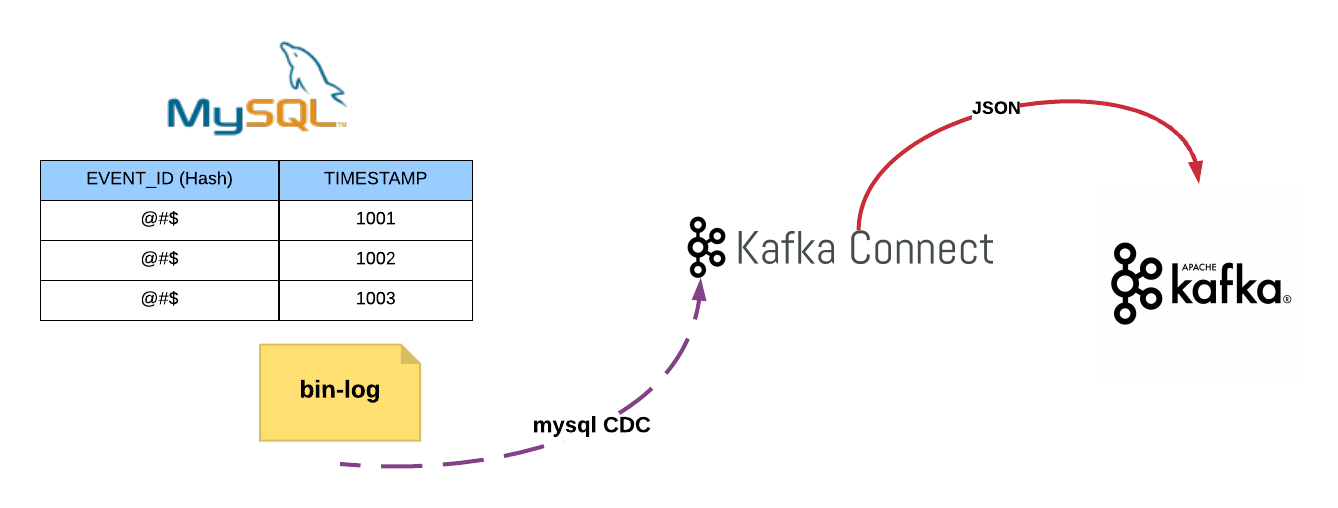
MySql Change Data Capturing With Kafka Connect


Software & tools you need to setup

      1. Install MySql 5.7 in your local machine.
    2. JDK 1.8
    3. Maven
    4. Confluent platform 3.2.2
    5. Download below JARs from maven repository  (https://mvnrepository.com/artifact)     

debezium-core-0.5.2.jar,
debezium-connector-mysql-0.5.2.jar,
mysql-binlog-connector-java-0.9.2.jar ,
mysql-connector-java-5.1.40.jar,
protobuf-java-2.6.1.jar, wkb-1.0.2.jar

Steps: 

1. Enable bin-log in mysql and create database and table in mysql

  • Go to /etc/mysql/mysql.conf.d folder
Open and add below lines to mysqld.cnf file

#bin logs
server-id         = 223344
log_bin           = mysql-bin
binlog_format     = row
binlog_row_image  = full
expire_logs_days  = 1
log-bin-index     = bin-log.index

Restart mysql

$ /etc/init.d/mysql stop
$ /etc/init.d/mysql start

Create mysql db and table

$ mysql -u root -p root

mysql> create database eventsource;
mysql>  DROP TABLE IF EXISTS `CMDB_TAG`;
CREATE TABLE `CMDB_TAG` (
 `VERSION` bigint(20) DEFAULT NULL,
 `TAG_KEY` varchar(255),
 `TAG_VALUE` varchar(255),
 PRIMARY KEY (`TAG_KEY`, `TAG_VALUE`)
) ENGINE=InnoDB DEFAULT CHARSET=latin1;

2. Create mysql user with proper privileges


$ mysql -u root -p root

mysql>  GRANT SELECT, RELOAD, SHOW DATABASES, REPLICATION SLAVE, REPLICATION CLIENT ON *.* TO 'debezium' IDENTIFIED BY 'dbz';

3. Start Zookeeper


$ cd  ~/software/confluent-3.2.2


confluent-3.2.2$ nohup ./bin/zookeeper-server-start ./etc/kafka/zookeeper.properties &

4. Start Kafka


confluent-3.2.2$ nohup ./bin/kafka-server-start ./etc/kafka/server.properties > kafka.log 2>&1 &

Create kafka topic named events

confluent-3.2.2$ bin/kafka-topics  --create --zookeeper localhost:2181 --replication-factor 3 --partitions 6 --topic  events --config min.insync.replicas=2 --config unclean.leader.election.enable=false

5.  Setup mysql kafka connector


Create directory called kafka-connect-cdc within confluent

confluent-3.2.2$ cd share/java
$ mkdir kafka-connect-cdc

Rename debezium-connector-mysql-0.5.2.jar as kafka-connect-cdc.jar

$ mv debezium-connector-mysql-0.5.2.jar as kafka-connect-cdc.jar

Copy all the downloaded jar into kafka-connect-cdc directory

confluent-3.2.2/share/java/kafka-connect-cdc$ ls
debezium-core-0.5.2.jar  kafka-connect-cdc.jar mysql-binlog-connector-java-0.9.2.jar  mysql-connector-java-5.1.40.jar protobuf-java-2.6.1.jar wkb-1.0.2.jar

Configure Connector

Go to etc folder

$ cd etc

Create directory called kafka-connect-cdc

$ mkdir kafka-connect-cdc

Create property file called kafka-connect-cdc.properties
$ touch kafka-connect-cdc.properties

Copy below content to kafka-connect-cdc.properties file

name=mysql-source
connector.class=io.debezium.connector.mysql.MySqlConnector
database.hostname=localhost
database.port=3306
database.user=debezium
database.password=dbz
server.id=223344
database.server.name=eventsource
database.history.kafka.bootstrap.servers=localhost:9092
database.whitelist=eventsource
database.history.kafka.topic=events
tasks.max=10

Start mysql cdc connector

confluent-3.2.2$  nohup ./bin/connect-standalone etc/kafka/connect-standalone.properties  etc/kafka-connect-cdc/kafka-connect-cdc.properties > jdbc.log 2>&1 &

6. List Kafka topics


confluent-3.2.2$ bin/kafka-topics --zookeeper localhost:2181 --list

__consumer_offsets
events
eventsource
eventsource.eventsource.CMDB_TAG 
  • You can see that connector has created, two topics which is highlighted in yellow color.

7. Consume JSON messages from Kafka


confluent-3.2.2$ bin/kafka-console-consumer --bootstrap-server localhost:9092 --topic eventsource.eventsource.CMDB_TAG

8. Testing the Connector


Do some CRUD operation on table that we have created

mysql> use eventsource;
mysql> insert into CMDB_TAG (VERSION,TAG_KEY,TAG_VALUE) values(0,'TEST4','TEST1');


update CMDB_TAG set VERSION = 1 where TAG_KEY = 'TEST4' and TAG_VALUE = 'TEST1';


delete from CMDB_TAG where TAG_KEY = 'TEST4' and TAG_VALUE = 'TEST1';

From Kafka consumer console you can see following JSON messages.

{"schema":{"type":"struct","fields":[{"type":"struct","fields":[{"type":"int64","optional":true,"field":"VERSION"},{"type":"string","optional":false,"field":"TAG_KEY"},{"type":"string","optional":false,"field":"TAG_VALUE"}],"optional":true,"name":"eventsource.eventsource.CMDB_TAG.Value","field":"before"},{"type":"struct","fields":[{"type":"int64","optional":true,"field":"VERSION"},{"type":"string","optional":false,"field":"TAG_KEY"},{"type":"string","optional":false,"field":"TAG_VALUE"}],"optional":true,"name":"eventsource.eventsource.CMDB_TAG.Value","field":"after"},{"type":"struct","fields":[{"type":"string","optional":false,"field":"name"},{"type":"int64","optional":false,"field":"server_id"},{"type":"int64","optional":false,"field":"ts_sec"},{"type":"string","optional":true,"field":"gtid"},{"type":"string","optional":false,"field":"file"},{"type":"int64","optional":false,"field":"pos"},{"type":"int32","optional":false,"field":"row"},{"type":"boolean","optional":true,"field":"snapshot"},{"type":"int64","optional":true,"field":"thread"},{"type":"string","optional":true,"field":"db"},{"type":"string","optional":true,"field":"table"}],"optional":false,"name":"io.debezium.connector.mysql.Source","field":"source"},{"type":"string","optional":false,"field":"op"},{"type":"int64","optional":true,"field":"ts_ms"}],"optional":false,"name":"eventsource.eventsource.CMDB_TAG.Envelope","version":1},"payload":{"before":null,"after":{"VERSION":0,"TAG_KEY":"TEST4","TAG_VALUE":"TEST1"},"source":{"name":"eventsource","server_id":223344,"ts_sec":1527283334,"gtid":null,"file":"mysql-bin.000003","pos":1984,"row":0,"snapshot":null,"thread":5,"db":"eventsource","table":"CMDB_TAG"},"op":"c","ts_ms":1527283334083}}
 
{"schema":{"type":"struct","fields":[{"type":"struct","fields":[{"type":"int64","optional":true,"field":"VERSION"},{"type":"string","optional":false,"field":"TAG_KEY"},{"type":"string","optional":false,"field":"TAG_VALUE"}],"optional":true,"name":"eventsource.eventsource.CMDB_TAG.Value","field":"before"},{"type":"struct","fields":[{"type":"int64","optional":true,"field":"VERSION"},{"type":"string","optional":false,"field":"TAG_KEY"},{"type":"string","optional":false,"field":"TAG_VALUE"}],"optional":true,"name":"eventsource.eventsource.CMDB_TAG.Value","field":"after"},{"type":"struct","fields":[{"type":"string","optional":false,"field":"name"},{"type":"int64","optional":false,"field":"server_id"},{"type":"int64","optional":false,"field":"ts_sec"},{"type":"string","optional":true,"field":"gtid"},{"type":"string","optional":false,"field":"file"},{"type":"int64","optional":false,"field":"pos"},{"type":"int32","optional":false,"field":"row"},{"type":"boolean","optional":true,"field":"snapshot"},{"type":"int64","optional":true,"field":"thread"},{"type":"string","optional":true,"field":"db"},{"type":"string","optional":true,"field":"table"}],"optional":false,"name":"io.debezium.connector.mysql.Source","field":"source"},{"type":"string","optional":false,"field":"op"},{"type":"int64","optional":true,"field":"ts_ms"}],"optional":false,"name":"eventsource.eventsource.CMDB_TAG.Envelope","version":1},"payload":{"before":{"VERSION":0,"TAG_KEY":"TEST4","TAG_VALUE":"TEST1"},"after":{"VERSION":1,"TAG_KEY":"TEST4","TAG_VALUE":"TEST1"},"source":{"name":"eventsource","server_id":223344,"ts_sec":1527283762,"gtid":null,"file":"mysql-bin.000003","pos":2279,"row":0,"snapshot":null,"thread":5,"db":"eventsource","table":"CMDB_TAG"},"op":"u","ts_ms":1527283762079}}
{"schema":{"type":"struct","fields":[{"type":"struct","fields":[{"type":"int64","optional":true,"field":"VERSION"},{"type":"string","optional":false,"field":"TAG_KEY"},{"type":"string","optional":false,"field":"TAG_VALUE"}],"optional":true,"name":"eventsource.eventsource.CMDB_TAG.Value","field":"before"},{"type":"struct","fields":[{"type":"int64","optional":true,"field":"VERSION"},{"type":"string","optional":false,"field":"TAG_KEY"},{"type":"string","optional":false,"field":"TAG_VALUE"}],"optional":true,"name":"eventsource.eventsource.CMDB_TAG.Value","field":"after"},{"type":"struct","fields":[{"type":"string","optional":false,"field":"name"},{"type":"int64","optional":false,"field":"server_id"},{"type":"int64","optional":false,"field":"ts_sec"},{"type":"string","optional":true,"field":"gtid"},{"type":"string","optional":false,"field":"file"},{"type":"int64","optional":false,"field":"pos"},{"type":"int32","optional":false,"field":"row"},{"type":"boolean","optional":true,"field":"snapshot"},{"type":"int64","optional":true,"field":"thread"},{"type":"string","optional":true,"field":"db"},{"type":"string","optional":true,"field":"table"}],"optional":false,"name":"io.debezium.connector.mysql.Source","field":"source"},{"type":"string","optional":false,"field":"op"},{"type":"int64","optional":true,"field":"ts_ms"}],"optional":false,"name":"eventsource.eventsource.CMDB_TAG.Envelope","version":1},"payload":{"before":{"VERSION":1,"TAG_KEY":"TEST4","TAG_VALUE":"TEST1"},"after":null,"source":{"name":"eventsource","server_id":223344,"ts_sec":1527283970,"gtid":null,"file":"mysql-bin.000003","pos":2596,"row":0,"snapshot":null,"thread":5,"db":"eventsource","table":"CMDB_TAG"},"op":"d","ts_ms":1527283970341}}
{"schema":null,"payload":null}
  • I have highlighted the db operations in pink color.
  • Also once we delete a record we have received last JSON, which is highlighted in green.


References: