5/20/2018

Event Sourcing for Micro Services


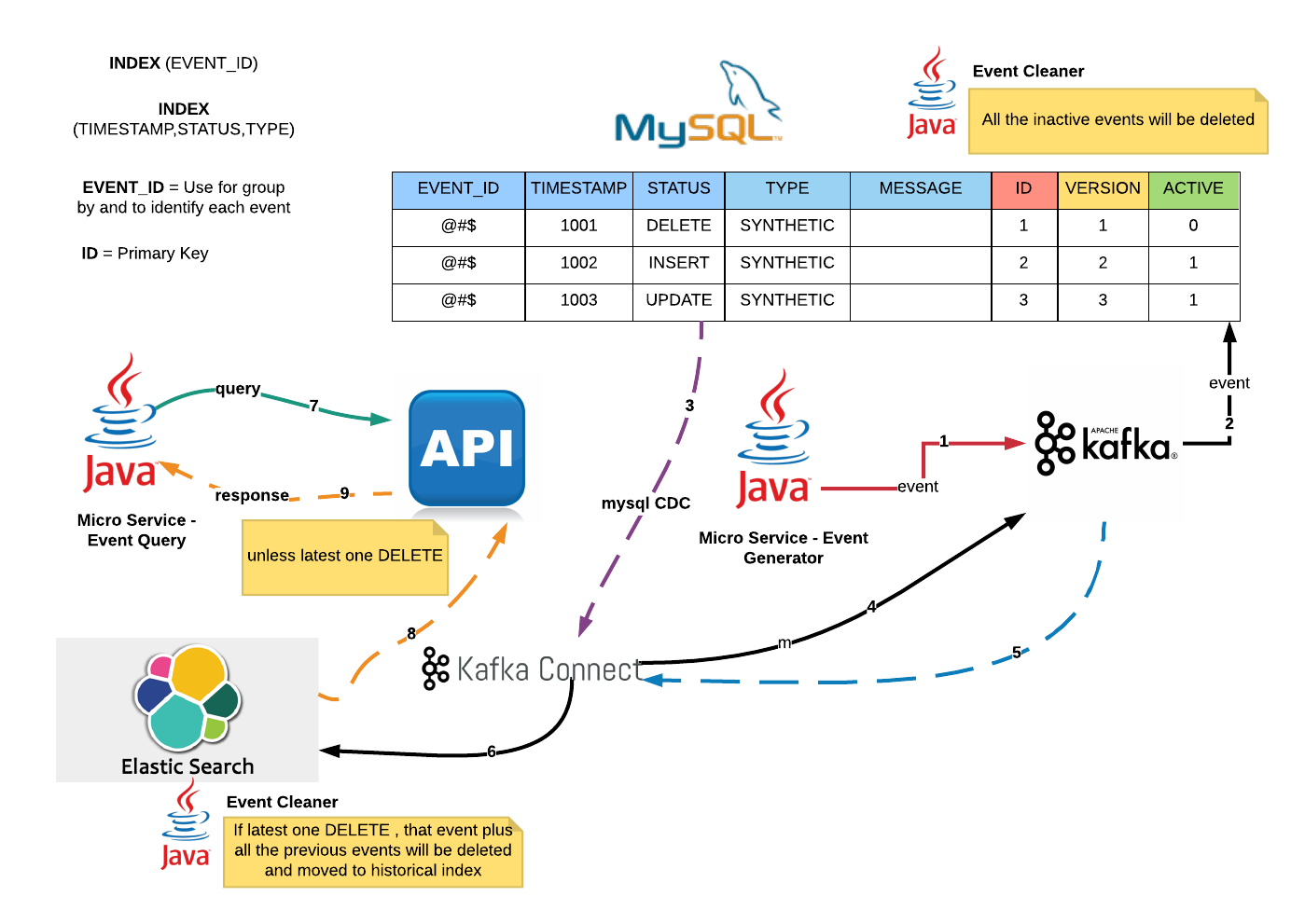
This is a hypothetical & high level architecture for Event Sourcing.

Key Architectural Considerations

1. Beyond Eventual Consistency.
2. Asynchronous.
3. Command Query Responsibility Segregation (CQRS).
4. Fault tolerant & Fail safe
5. Scalability.
6. Zero event lost & Exactly once.

Brief Explanation.

1. Micro-services application will publish events to Kafka.
2. Kafka consumer (sink connector) will consume and insert into Mysql Event Source table within a transactional context.
3. Mysql Change Data Capture (source connector) which runs within Kafka Connect will detect changes.
4. Kafka source connector will transform events and publish to Kafka.
5. Kafka connect will consume events from Kafka.
6. Elasticsearch sink connector will insert events into ES and update relevant MySql record activeness within transactional context.
7. Micro-Service query data from API.
8 & 9. API return latest data unless it's an DELETE event.

Events Cleaning

1. There are schedulers to clean/delete both MySQL and ES active index.
2. All the events will be rest in historical index.
3. MySQL events will be partitioned based on it's activeness.

5/07/2018

Setup Spark Standalone Mode HA Cluster With Shell Script


From previous post [1], we have showed, how to setup standalone mode spark cluster and now we are going to improve the architecture by adding stand by master to achieve high availability (fault tolerance) of master role.

[1] http://dhanuka84.blogspot.com/2018/05/setup-spark-standalone-mode-cluster.html


Setup Zookeeper

1. I am using Zookeeper (ZK) version 3.4.12 . Download & extract ZK from site [1].

[1] http://www-eu.apache.org/dist/zookeeper/stable/

2. Go to ZK folder and create configuration file

zookeeper-3.4.12]$  cp conf/zoo_sample.cfg conf/zoo.cfg

3. Edit zoo.cfg file

dataDir=/home/dhanuka/zookeeper-3.4.12/data

4. Start ZK

zookeeper-3.4.12]$ ./bin/zkServer.sh start 


Spark Standalone Mode Zookeeper configuration

1. $SPARK_HOME/conf/spark-env.sh HA configuration

SPARK_DAEMON_JAVA_OPTS="-Dspark.deploy.recoveryMode=ZOOKEEPER  -Dspark.deploy.zookeeper.url=10.163.134.152:2181  -Dspark.deploy.zookeeper.dir=/spark"

2. Same configuration will be applied in stand by master node (153).

3. Slaves will be pointing to both masters and primary master will be boot-up first.

4. Full script to boot-up both masters and slaves

Script

cp $SPARK_HOME/conf/spark-env.sh.template $SPARK_HOME/conf/spark-env.sh
cp $SPARK_HOME/conf/spark-env.sh.template $SPARK_HOME/conf/spark-second-env.sh
sed -i  '$ a\SPARK_MASTER_HOST=10.163.134.151'   $SPARK_HOME/conf/spark-env.sh
sed -i  '$ a\SPARK_MASTER_WEBUI_PORT=8085'   $SPARK_HOME/conf/spark-env.sh
sed -i  '$ a\SPARK_MASTER_WEBUI_PORT=8085'   $SPARK_HOME/conf/spark-second-env.sh
sed -i  '$ a\SPARK_DAEMON_JAVA_OPTS="-Dspark.deploy.recoveryMode=ZOOKEEPER  -Dspark.deploy.zookeeper.url=10.163.134.152:2181  -Dspark.deploy.zookeeper.dir=/spark"' $SPARK_HOME/conf/spark-env.sh
sed -i  '$ a\SPARK_DAEMON_JAVA_OPTS="-Dspark.deploy.recoveryMode=ZOOKEEPER  -Dspark.deploy.zookeeper.url=10.163.134.152:2181  -Dspark.deploy.zookeeper.dir=/spark"' $SPARK_HOME/conf/spark-second-env.sh
cp $SPARK_HOME/conf/slaves.template $SPARK_HOME/conf/slaves
sed -i  '$ a\10.163.134.151\n10.163.134.152\n10.163.134.153'   $SPARK_HOME/conf/slaves


echo " Stop anything that is running"
$SPARK_HOME/sbin/stop-all.sh

sleep 2

echo " Start Master"
$SPARK_HOME/sbin/start-master.sh

# Pause
sleep 10


echo "start stand by Master"

scp $SPARK_HOME/conf/spark-second-env.sh dhanuka@10.163.134.153:$SPARK_HOME/conf/
ssh dhanuka@10.163.134.153 'cp $SPARK_HOME/conf/spark-second-env.sh $SPARK_HOME/conf/spark-env.sh'
ssh dhanuka@10.163.134.153 'sed -i  "$ a\SPARK_MASTER_HOST=10.163.134.153"   $SPARK_HOME/conf/spark-env.sh'

scp ha.conf dhanuka@10.163.134.153:/home/dhanuka/
ssh dhanuka@10.163.134.153 '$SPARK_HOME/sbin/start-master.sh --host 10.163.134.153'


sleep 5

echo " Start Workers"
#SPARK_SSH_FOREGROUND=true  $SPARK_HOME/sbin/start-slaves.sh
SPARK_SSH_FOREGROUND=true  $SPARK_HOME/sbin/start-slaves.sh  spark://10.163.134.151:7077,10.163.134.153:7077


Run Bootstrap Script & Validate

1. $ sh setup.sh 

 Stop anything that is running
10.163.134.151: no org.apache.spark.deploy.worker.Worker to stop
10.163.134.152: no org.apache.spark.deploy.worker.Worker to stop
10.163.134.153: no org.apache.spark.deploy.worker.Worker to stop
no org.apache.spark.deploy.master.Master to stop
 Start Master
starting org.apache.spark.deploy.master.Master, logging to /home/dhanuka/spark-2.2.1-bin-hadoop2.7/logs/spark-dhanuka-org.apache.spark.deploy.master.Master-1-bo3uxgmpxxxxnn.out
start stand by Master
spark-second-env.sh                                                                                                             100% 3943    12.6MB/s   00:00   
ha.conf                                                                                                                         100%  117   496.8KB/s   00:00   
starting org.apache.spark.deploy.master.Master, logging to /home/dhanuka/spark-2.2.1-bin-hadoop2.7/logs/spark-dhanuka-org.apache.spark.deploy.master.Master-1-bo3uxgmpxxxxnn.out
 Start Workers
10.163.134.151: starting org.apache.spark.deploy.worker.Worker, logging to /home/dhanuka/spark-2.2.1-bin-hadoop2.7/logs/spark-dhanuka-org.apache.spark.deploy.worker.Worker-1-bo3uxgmpxxxxnn.out
10.163.134.152: starting org.apache.spark.deploy.worker.Worker, logging to /home/dhanuka/spark-2.2.1-bin-hadoop2.7/logs/spark-dhanuka-org.apache.spark.deploy.worker.Worker-1-bo3uxgmpxxxxnn.out
10.163.134.153: starting org.apache.spark.deploy.worker.Worker, logging to /home/dhanuka/spark-2.2.1-bin-hadoop2.7/logs/spark-dhanuka-org.apache.spark.deploy.worker.Worker-1-bo3uxgmpxxxxnn.out


2. Validate Master node and worker node in 151

$ ps -ef | grep spark
 
dhanuka   2178     1  8 23:20 pts/0    00:00:03 /usr/lib/jvm/java-1.8.0-openjdk-1.8.0.151-1.b12.el7_4.x86_64/jre/bin/java -cp /home/dhanuka/spark-2.2.1-bin-hadoop2.7/conf/:/home/dhanuka/spark-2.2.1-bin-hadoop2.7/jars/* -Dspark.deploy.recoveryMode=ZOOKEEPER -Dspark.deploy.zookeeper.url=10.163.134.152:2181 -Dspark.deploy.zookeeper.dir=/spark -Xmx1g org.apache.spark.deploy.master.Master --host 10.163.134.151 --port 7077 --webui-port 8085
dhanuka   2289     1 22 23:20 ?        00:00:03 /usr/lib/jvm/java-1.8.0-openjdk-1.8.0.151-1.b12.el7_4.x86_64/jre/bin/java -cp /home/dhanuka/spark-2.2.1-bin-hadoop2.7/conf/:/home/dhanuka/spark-2.2.1-bin-hadoop2.7/jars/* -Dspark.deploy.recoveryMode=ZOOKEEPER -Dspark.deploy.zookeeper.url=10.163.134.152:2181 -Dspark.deploy.zookeeper.dir=/spark -Xmx1g org.apache.spark.deploy.worker.Worker --webui-port 8081 spark://10.163.134.151:7077
dhanuka   2347 30581  0 23:21 pts/0    00:00:00 grep --color=auto spark


 3. Validate Standby Master and worker which reside in 153

 $ ps -ef | grep spark

dhanuka   4738     1  5 23:19 ?        00:00:02 /usr/lib/jvm/java-1.8.0-openjdk-1.8.0.151-1.b12.el7_4.x86_64/jre/bin/java -cp /home/dhanuka/spark-2.2.1-bin-hadoop2.7/conf/:/home/dhanuka/spark-2.2.1-bin-hadoop2.7/jars/* -Dspark.deploy.recoveryMode=ZOOKEEPER -Dspark.deploy.zookeeper.url=10.163.134.152:2181 -Dspark.deploy.zookeeper.dir=/spark -Xmx1g org.apache.spark.deploy.master.Master --host 10.163.134.153 --port 7077 --webui-port 8085 --host 10.163.134.153
dhanuka   4829     1  6 23:20 ?        00:00:02 /usr/lib/jvm/java-1.8.0-openjdk-1.8.0.151-1.b12.el7_4.x86_64/jre/bin/java -cp /home/dhanuka/spark-2.2.1-bin-hadoop2.7/conf/:/home/dhanuka/spark-2.2.1-bin-hadoop2.7/jars/* -Dspark.deploy.recoveryMode=ZOOKEEPER -Dspark.deploy.zookeeper.url=10.163.134.152:2181 -Dspark.deploy.zookeeper.dir=/spark -Xmx1g org.apache.spark.deploy.worker.Worker --webui-port 8081 spark://10.163.134.151:7077
dhanuka   4881  2354  0 23:20 pts/0    00:00:00 grep --color=auto spark


4.  Spark Admin Panels

Lead Master (Primary)


Stand-by Master (Secondary)


 Verify Spark Master fault tolerance support.

1. Let's kill the primary master.

$ kill -9 2178

2. Within 1-2 minutes time, you can see that stand by master lead the workers.


References:

[1]  http://spark.apache.org/docs/latest/spark-standalone.html#cluster-launch-scripts

[2]  https://dzone.com/articles/spark-and-zookeeper-fault

[3] https://mapr.com/support/s/article/How-to-enable-High-Availability-on-Spark-with-Zookeeper?language=en_US

[4] https://jaceklaskowski.gitbooks.io/mastering-apache-spark/content/exercises/spark-exercise-standalone-master-ha.html


5/04/2018

Setup Spark Standalone Mode Cluster With Shell Script


I am using spark-2.2.1-bin-hadoop2.7.tgz file from spark download site.
Also there are three virtual machines (151,152,153) and both Master and one of the slave will be running in 151.

Prerequisites : Installed Java 1.8 in all virtual machines.


Configure SSH Key-Based Authentication on a Linux Server

1. Run below command in all the three nodes to generate public & private keys.
   For each question just press Enter button (keep password blank).

$ ssh-keygen -t rsa

2. Copy Master public key in slave nodes. Enter user password for each node.

$ ssh-copy-id dhanuka@10.163.134.151
$ ssh-copy-id dhanuka@10.163.134.152
$ ssh-copy-id dhanuka@10.163.134.153

Copy spark for slave nodes

$ scp -r $SPARK_HOME dhanuka@10.163.134.152:~
$ scp -r $SPARK_HOME dhanuka@10.163.134.153:~


Spark environment variable setup

1. Change ~/.bashrc file as below and run source command in each node


export SPARK_HOME=/home/dhanuka/spark-2.2.1-bin-hadoop2.7

export PATH=$PATH:$SPARK_HOME/bin

2. $  source ~/.bash_profile

Bootstrap master and other slave nodes using setup.sh shell script

 $ ./setup.sh

Stop anything that is running
localhost: stopping org.apache.spark.deploy.worker.Worker
10.163.134.151: no org.apache.spark.deploy.worker.Worker to stop
10.163.134.152: stopping org.apache.spark.deploy.worker.Worker
10.163.134.153: no org.apache.spark.deploy.worker.Worker to stop
stopping org.apache.spark.deploy.master.Master
 Start Master
starting org.apache.spark.deploy.master.Master, logging to /home/dhanuka/spark-2.2.1-bin-hadoop2.7/logs/spark-dhanuka-org.apache.spark.deploy.master.Master-1-bo3uxgmpxxxxnn.out
 Start Workers
localhost: starting org.apache.spark.deploy.worker.Worker, logging to /home/dhanuka/spark-2.2.1-bin-hadoop2.7/logs/spark-dhanuka-org.apache.spark.deploy.worker.Worker-1-bo3uxgmpxxxxnn.out
10.163.134.151: org.apache.spark.deploy.worker.Worker running as process 27165.  Stop it first.
10.163.134.152: starting org.apache.spark.deploy.worker.Worker, logging to /home/dhanuka/spark-2.2.1-bin-hadoop2.7/logs/spark-dhanuka-org.apache.spark.deploy.worker.Worker-1-bo3uxgmpxxxxnn.out
10.163.134.153: starting org.apache.spark.deploy.worker.Worker, logging to /home/dhanuka/spark-2.2.1-bin-hadoop2.7/logs/spark-dhanuka-org.apache.spark.deploy.worker.Worker-1-bo3uxgmpxxxxnn.out


Script

#!/bin/bash

source ~/.bash_profile
export SPARK_SSH_FOREGROUND="yes"

cp $SPARK_HOME/conf/spark-env.sh.template $SPARK_HOME/conf/spark-env.sh
sed -i  '$ a\SPARK_MASTER_HOST=10.163.134.151'   $SPARK_HOME/conf/spark-env.sh
sed -i  '$ a\SPARK_MASTER_WEBUI_PORT=8085'   $SPARK_HOME/conf/spark-env.sh


cp $SPARK_HOME/conf/slaves.template $SPARK_HOME/conf/slaves
sed -i  '$ a\10.163.134.151\n10.163.134.152\n10.163.134.153'   $SPARK_HOME/conf/slaves

echo " Stop anything that is running"
$SPARK_HOME/sbin/stop-all.sh

sleep 2

echo " Start Master"
$SPARK_HOME/sbin/start-master.sh


# Pause
sleep 20

echo " Start Workers"
SPARK_SSH_FOREGROUND=true  $SPARK_HOME/sbin/start-slaves.sh


Master Admin Panel


References:

[1] https://www.digitalocean.com/community/tutorials/how-to-set-up-ssh-keys--2


5/01/2018

Create Scala Project From Maven


In here I am using Scala version 2.11.8 and Java version 1.8.

Environment setup in .profile
#scala,java,maven setup
export SCALA_HOME=/home/dhanuka/software/scala-2.11.8

export JAVA_HOME=/home/dhanuka/software/jdk1.8.0_131
export MAVEN_HOME=/home/dhanuka/software/apache-maven-3.3.9
PATH=$PATH:$JAVA_HOME/bin:$MAVEN_HOME/bin:$SCALA_HOME/bin


$ source ~/.profile


Create Maven Project

1. $ mvn archetype:generate 

2. select net.alchim31.maven filter and number for that is 925 . 

$ 925

Then Choose net.alchim31.maven:scala-archetype-simple version:

Choose a number: 3: 3

3. Then type groupId , ArtifactId and etc...

Define value for property 'groupId': org.maven.scala

Define value for property 'artifactId': myfirst-scala

Define value for property 'version' 1.0-SNAPSHOT: :
Define value for property 'package' org.scala.maven: :

Y: : Y

$ ls

myfirst-scala

$ mvn package

[ERROR] /home/uranadh/research/scala/first/myfirst-scala/src/test/scala/samples/specs.scala:18: error: not found: type JUnitRunner
[ERROR] @RunWith(classOf[JUnitRunner])
[ERROR]                  ^
[ERROR] one error found
[INFO] ------------------------------------------------------------------------
[INFO] BUILD FAILURE


Troubleshooting pom.xml

1. Change compiler version to 1.8

<maven.compiler.source>1.8</maven.compiler.source><maven.compiler.target>1.8</maven.compiler.target>


2. Change Scala version to 2.11.8

<scala.version>2.11.8</scala.version>

3. Add specs2-junit_ dependency.

<dependency>
      <groupId>org.specs2</groupId>
      <artifactId>specs2-junit_${scala.compat.version}</artifactId>
      <version>2.4.16</version>
      <scope>test</scope>
 </dependency>


4. Build again

$ mvn package

5. Jar location

myfirst-scala/target/myfirst-scala-1.0-SNAPSHOT.jar


Full pom.xml file

<project xmlns="http://maven.apache.org/POM/4.0.0" xmlns:xsi="http://www.w3.org/2001/XMLSchema-instance" xsi:schemaLocation="http://maven.apache.org/POM/4.0.0 http://maven.apache.org/maven-v4_0_0.xsd">
  <modelVersion>4.0.0</modelVersion>
  <groupId>org.maven.scala</groupId>
  <artifactId>myfirst-scala</artifactId>
  <version>1.0-SNAPSHOT</version>
  <name>${project.artifactId}</name>
  <description>My wonderfull scala app</description>
  <inceptionYear>2015</inceptionYear>
  <licenses>
    <license>
      <name>My License</name>
      <url>http://....</url>
      <distribution>repo</distribution>
    </license>
  </licenses>

  <properties>
    <maven.compiler.source>1.8</maven.compiler.source>
    <maven.compiler.target>1.8</maven.compiler.target>
    <encoding>UTF-8</encoding>
    <scala.version>2.11.8</scala.version>
    <scala.compat.version>2.11</scala.compat.version>
  </properties>

  <dependencies>
    <dependency>
      <groupId>org.scala-lang</groupId>
      <artifactId>scala-library</artifactId>
      <version>${scala.version}</version>
    </dependency>

    <!-- Test -->
    <dependency>
      <groupId>junit</groupId>
      <artifactId>junit</artifactId>
      <version>4.11</version>
      <scope>test</scope>
    </dependency>
    <dependency>
      <groupId>org.specs2</groupId>
      <artifactId>specs2-core_${scala.compat.version}</artifactId>
      <version>2.4.16</version>
      <scope>test</scope>
    </dependency>
    <dependency>
      <groupId>org.scalatest</groupId>
      <artifactId>scalatest_${scala.compat.version}</artifactId>
      <version>2.2.4</version>
      <scope>test</scope>
    </dependency>

    <dependency>
      <groupId>org.specs2</groupId>
      <artifactId>specs2-junit_${scala.compat.version}</artifactId>
      <version>2.4.16</version>
      <scope>test</scope>
    </dependency>
  </dependencies>

  <build>
    <sourceDirectory>src/main/scala</sourceDirectory>
    <testSourceDirectory>src/test/scala</testSourceDirectory>
    <plugins>
      <plugin>
        <!-- see http://davidb.github.com/scala-maven-plugin -->
        <groupId>net.alchim31.maven</groupId>
        <artifactId>scala-maven-plugin</artifactId>
        <version>3.2.0</version>
        <executions>
          <execution>
            <goals>
              <goal>compile</goal>
              <goal>testCompile</goal>
            </goals>
            <configuration>
              <args>
                <!--arg>-make:transitive</arg-->
                <arg>-dependencyfile</arg>
                <arg>${project.build.directory}/.scala_dependencies</arg>
              </args>
            </configuration>
          </execution>
        </executions>
      </plugin>
      <plugin>
        <groupId>org.apache.maven.plugins</groupId>
        <artifactId>maven-surefire-plugin</artifactId>
        <version>2.18.1</version>
        <configuration>
          <useFile>false</useFile>
          <disableXmlReport>true</disableXmlReport>
          <!-- If you have classpath issue like NoDefClassError,... -->
          <!-- useManifestOnlyJar>false</useManifestOnlyJar -->
          <includes>
            <include>**/*Test.*</include>
            <include>**/*Suite.*</include>
          </includes>
        </configuration>
      </plugin>
    </plugins>
  </build>
</project>


References:

https://docs.scala-lang.org/tutorials/scala-with-maven.html

4/28/2018

Spark Cassandra Integration with spark-cassandra-connector

In here, I am going to show how to integrate local single node Cassandra db with standalone spark using spark-cassandra-connector.

Setup Cassandra, Spark, Scala & ScalaBuildTool

1. Download Cassandra & Spark. I am using Cassandra version 3.11.2  and Spark version 2.2.1 .

http://cassandra.apache.org/download/
https://spark.apache.org/releases/spark-release-2-2-1.html
https://www.scala-lang.org/download/2.11.8.html
https://www.scala-sbt.org/download.html

2. Environment setup in .profile

#cassandra setup
export CASSANDRA_HOME=/home/dhanuka/software/apache-cassandra-3.11.2

#spark, sbt and scala setup
export SPARK_HOME=/home/dhanuka/software/spark/spark-2.2.1-bin-hadoop2.7
export SBT_HOME=/home/dhanuka/software/spark/sbt-launcher-packaging-0.13.13
export SCALA_HOME=/home/dhanuka/software/scala-2.11.8

PATH=$PATH:$JAVA_HOME/bin:$MAVEN_HOME/bin:SPARK_HOME/bin:$SBT_HOME/bin:$SCALA_HOME/bin:CASSANDRA_HOME/bin

3. $ source ~/.profile 

Create Cassandra Keyspace and Table

 1. Start cassandra with following command

$ cassandra -f

2. Start CQL shell

$ cqlsh

3. Create keyspace and a table

cqlsh> CREATE KEYSPACE people WITH replication = {'class': 'SimpleStrategy', 'replication_factor':1};

cqlsh> use people;

cqlsh:people> CREATE TABLE users(
          ... id varchar ,
          ... first_name varchar,
          ... last_name varchar,
          ... city varchar,
          ... emails varchar,
          ... PRIMARY KEY (id));


cqlsh:people>  Insert into users (id,first_name,last_name,city,emails) values('1','dhanuka','ranasinghe','colombo','dhanuka.priyanath@gmail.com');

 cqlsh:people> select * from users;

 id      | city    | emails                      | first_name | last_name
---------+---------+-----------------------------+------------+------------
 1 | colombo | dhanuka.priyanath@gmail.com |    dhanuka | ranasinghe


Build spark-cassandra-connector.

1. clone from git hub repository.

$  git clone https://github.com/datastax/spark-cassandra-connector.git 

$  cd spark-cassandra-connector

2. Build the project with scala 2.11 and cassandra 3.11.2

$  spark-cassandra-connector$ sbt -Dscala-2.11=true -Dtest.cassandra.version=3.11.2 assembly

You can find the jar location below.

$  spark-cassandra-connector/spark-cassandra-connector/target/full/scala-2.11/spark-cassandra-connector-assembly-2.0.7-82-g0369a7b.jar

$  mv  spark-cassandra-connector-assembly-2.0.7-82-g0369a7b.jar   spark-cassandra-connector-assembly-2.0.7.jar


 Connect Spark with Cassandra through Spark-Shell

1. Copy cassandra-connector-assembly-2.0.7.jar to spark jars location. Copy to below location

$  cp cassandra-connector-assembly-2.0.7.jar  $SPARK_HOME/jars

2.  Start spark-shell

$ spark-shell --jars $SPARK_HOME/jars/spark-cassandra-connector-assembly-2.0.7.jar

3. Stop current spark context

scala> sc.stop

4. Program to read Cassandra from spark

scala> import com.datastax.spark.connector._, org.apache.spark.SparkContext, org.apache.spark.SparkContext._, org.apache.spark.SparkConf
import com.datastax.spark.connector._
import org.apache.spark.SparkContext
import org.apache.spark.SparkContext._
import org.apache.spark.SparkConf


scala> val conf = new SparkConf(true).set("spark.cassandra.connection.host", "localhost")
conf: org.apache.spark.SparkConf = org.apache.spark.SparkConf@2c2a7d53


scala> val sc = new SparkContext(conf)
sc: org.apache.spark.SparkContext = org.apache.spark.SparkContext@15914bb5


scala> val test_spark_rdd = sc.cassandraTable("people", "users")
test_spark_rdd: com.datastax.spark.connector.rdd.CassandraTableScanRDD[com.datastax.spark.connector.CassandraRow] = CassandraTableScanRDD[0] at RDD at CassandraRDD.scala:19


scala> test_spark_rdd.first
res1: com.datastax.spark.connector.CassandraRow = CassandraRow{id: 1, city: colombo, emails: dhanuka.priyanath@gmail.com, first_name: dhanuka, last_name: ranasinghe}


References:

[1] https://www.datastax.com/dev/blog/kindling-an-introduction-to-spark-with-cassandra-part-1

[2] https://www.youtube.com/watch?v=jpEABn80OCU


4/15/2018

Setup VNode Cassandra cluster in local machine

Here I am using Ubuntu Linux machine and also tool called Cassandra Cluster Manager (ccm).

Steps

1. :~/opensource$ mkdir cassandra

2. :~/opensource$ cd cassandra/

3. :~/opensource/cassandra$ git clone https://github.com/riptano/ccm.git

4. :~/opensource/cassandra$ cd ccm/

5. :~/opensource/cassandra/ccm$ ls

ccm  ccmlib  license.txt  MANIFEST.in  misc  NETWORK_ALIASES.md  README.md  setup.py  ssl  tests

6. :~/opensource/cassandra/ccm$ sudo ./setup.py install

7. :~/opensource/cassandra/ccm$ ccm create -v 3.11.2 -n 3 my_cluster --vnodes

10:22:00,960 ccm INFO Downloading http://archive.apache.org/dist/cassandra/3.11.2/apache-cassandra-3.11.2-bin.tar.gz to /tmp/ccm-Wo1DBu.tar.gz (36.656MB)
  38436262  [100.00%]10:24:09,353 ccm INFO Extracting /tmp/ccm-Wo1DBu.tar.gz as version 3.11.2 ...
Current cluster is now: my_cluster


cluster name: my_cluster
cassandra version: 3.11.2
number of nodes: 3

8.  :~/opensource/cassandra/ccm$ ccm list

*my_cluster

9. :~/opensource/cassandra/ccm$ ccm status
Cluster: 'my_cluster'
---------------------
node1: DOWN (Not initialized)
node3: DOWN (Not initialized)
node2: DOWN (Not initialized)


10. :~/opensource/cassandra/ccm$ ccm start
      :~/opensource/cassandra/ccm$ ccm status
Cluster: 'my_cluster'
---------------------
node1: UP
node3: UP
node2: UP


 11.
:~/opensource/cassandra/ccm$ ccm node1 status

Datacenter: datacenter1
=======================
Status=Up/Down
|/ State=Normal/Leaving/Joining/Moving
--  Address    Load       Tokens       Owns (effective)  Host ID                               Rack
UN  127.0.0.1  88.93 KiB  256          64.1%             5e9d0ad1-d7d0-4023-b71c-2f57375c2573  rack1
UN  127.0.0.2  69.9 KiB   256          67.3%             e8ea9b63-7846-4494-bd0d-2c8dfcb9274b  rack1
UN  127.0.0.3  103.62 KiB  256          68.7%             301887a5-b386-47c6-8a59-3f71ea09b9fc  rack1


12. :~/opensource/cassandra/ccm$ ccm node1 ring


Datacenter: datacenter1
==========
Address    Rack        Status State   Load            Owns                Token                                      
                                                                          9184122387525172037                        
127.0.0.3  rack1       Up     Normal  103.62 KiB      68.67%              -9188398778489235111                       
127.0.0.2  rack1       Up     Normal  69.9 KiB        67.27%              -9176942363448371450                       
127.0.0.3  rack1       Up     Normal  103.62 KiB      68.67%              -9165278195783829162                       
127.0.0.3  rack1       Up     Normal  103.62 KiB      68.67%              -9154226470359649220                       
127.0.0.3  rack1       Up     Normal  103.62 KiB      68.67%              -9105345187931701041                       
127.0.0.1  rack1       Up     Normal  88.93 KiB       64.06%              -9059861789902146091                       
127.0.0.1  rack1       Up     Normal  88.93 KiB       64.06%              -9006955999491952161                       
127.0.0.1  rack1       Up     Normal  88.93 KiB       64.06%              -8991976771179386553                       
127.0.0.1  rack1       Up     Normal  88.93 KiB       64.06%              -8974379714699893637                       
127.0.0.1  rack1       Up     Normal  88.93 KiB       64.06%              -8964003200974837827                       
127.0.0.2  rack1       Up     Normal  69.9 KiB        67.27%              -8885086536332616726                       
127.0.0.3  rack1       Up     Normal  103.62 KiB      68.67%              -8882333637674950203                       
127.0.0.2  rack1       Up     Normal  69.9 KiB        67.27%              -8866726432815074132     


13. :~/opensource/cassandra/ccm$ ccm stop

14. :~/opensource/cassandra/ccm$ ccm -h

12/18/2017

Anatomy of Micro services based & distributed Master Data Management Architecture


Please note this is improved version of previously[1] explained architecture.

Master Data Change Detection

  1. Admin Panel will change or add master data.
  2. Changes goes to DB.
  3. Update Hibernate First Level Cache.
  4. Distribute data via Kafka.
  5. Kafka Consumer detect master data change notification.
  6. Update Hazelcast Distributed map with which master data has been changed.
  7. Scheduler application task read from HZ map and get to know about which master data changed.
  8. Get latest data for changed master data from master data micro service.
  9. Update LocalEntityMap with business key and Entity.
  10. Update Business key to Primary key map.
  11. Removed master data notification record from HZ distributed map.


Scheduler Application Load Balancing

  1. Get Business key to primary key mapping to all master data.
  2. Update Business key to primary key mapping
  3. Read Business key to primary key map then load balanced among HZ cluster members.
  4. update HZ distributed map.
  5. Keep business keys which load balanced to local application node.


Processing using master data within scheduler task

  1. Read from HZ distributed map and get master data local to this node for processing and Keep them for processing.
  2. Take business keys to process.
  3. Get locally cached master data for business keys for processing.
  4. If can’t find in the cache get from micro service.