3/26/2022

AWS SNS and Lambda Lesson Learn


The purpose of this blog post is to share my recent experience with AWS budget alerting, using above AWS stack.

We can create an alert to trigger alert message when certain threshold increase at AWS budget.

Then what happen is, that alert message will publish to SNS topic and same message will be consumed by Lambda function.

We can do transform the message and sent to Microsoft Team channel through a Webhook. Please refer this document for more details about this approach.

https://aws.amazon.com/premiumsupport/knowledge-center/sns-lambda-webhooks-chime-slack-teams/


Steps


1. Create AWS Budget Alert

a. Create AWS Budget

https://docs.aws.amazon.com/cost-management/latest/userguide/budgets-create.html

b. Create AWS Alert

https://docs.aws.amazon.com/AmazonCloudWatch/latest/monitoring/gs_monitor_estimated_charges_with_cloudwatch.html#gs_creating_billing_alarm


2. Create Lambda function

https://docs.aws.amazon.com/lambda/latest/dg/getting-started-create-function.html

Now in our case we are using Python Lambda function. so please refer below section.

https://docs.aws.amazon.com/lambda/latest/dg/lambda-python.html

3. Subscribe Lambda function to SNS topic

https://docs.aws.amazon.com/sns/latest/dg/sns-lambda-as-subscriber.html


4. Analyzing the sample code from below document.

https://aws.amazon.com/premiumsupport/knowledge-center/sns-lambda-webhooks-chime-slack-teams/


#!/usr/bin/python3.6

import urllib3

import json

http = urllib3.PoolManager()

def lambda_handler(event, context):

    url = "https://outlook.office.com/webhook/xxxxxxx"

    msg = {

    "text": event['Records'][0]['Sns']['Message']

    }

    print('Type of message', type(msg))     

    encoded_msg = json.dumps(msg).encode('utf-8')

    resp = http.request('POST',url, body=encoded_msg)

    print("=====After encode======",encoded_msg)

    print({

    "status_code": resp.status,

    "response": resp.data

    })


5.  Unit Testing

Now we are getting a JSON message from SNS topic, but when we encode it, to send to MS team via webhook, we are getting HTTP 400 error code.

 b'{"text": {"accountId": "xxxxxxx", "timeStamp": "2022-03-17T17:40:03.434Z", 


6. Integration Testing


When we  send same JSON to SNS topic, Lambda function will send it to MS team successfully.

a. Publish message by clicking Publish message button.


Copy paste the JSON message in Message body section and click Publish Message button.


7. Debug with Cloud Watch Logs.


a. Click View logs in CloudWatch .


b. Click latest Log stream .


8. Comparison of two logs 


As you can see the different of above two logs, the success encoded JSON message, child node wrapped with a double quotes.


9. Improve Lambda Function to Transform Output Message.


Now we have improved the Lambda function to transform the output message to another JSON.


 #!/usr/bin/python3.6

import urllib3 

import json

import ast

http = urllib3.PoolManager() 

def lambda_handler(event, context): 

    url = "https://outlook.office.com/webhook/xxxxxxx"    

    alert_dict = event['Records'][0]['Sns']['Message']

    if isinstance(alert_dict, str):

      print('Type of variable is a string')

      alert_dict = ast.literal_eval(alert_dict)

    else:

      print('Type is variable is not a string')


    #Construct new json format

    title = "Budget Exceed Alert "

    limit = (alert_dict['budget']['budgetLimit']['amount'])

    threshold = (alert_dict['action']['actionThreshold']['value'])

    print("===========", type(limit))

    print("===========", threshold)

    actual_amount = (limit * threshold) /100


    alert_json = dict(AlertTitle=title,TimeStamp=alert_dict['timeStamp'],BudgetName=alert_dict['budget']['budgetName'],BudgetType=alert_dict['budget']['budgetType'],BudgetAmount=alert_dict['budget']['budgetLimit']['amount'],AlertThreshold=alert_dict['action']['actionThreshold']['value'],ActualAmount=actual_amount,AlertType=alert_dict['action']['notificationType'],Message=alert_dict['message'])

    summery = {

        "text": json.dumps(alert_json) 

    }


    print("===========", type(summery))

    print("=====Before JSON======", summery)

    json_object = json.dumps(summery)  

    encoded_msg = json_object.encode('utf-8')

    print("=====After encode======",encoded_msg)    

    resp = http.request('POST',url, body=encoded_msg)

    print({

        "status_code": resp.status, 

        "response": resp.data

    })


10. Unit Testing


11. Integration Testing


12. Conclusion

  • Now both, unite test and integration test will generate same output JSON.
  • The way create JSON is important in Python and it's bit tricky.

summery = {

        "text": json.dumps(alert_json) 

    }


  • Did you notice one difference in both testing?
Unit test : 32 : Integer value
Integration: 32.0 : Float value

Same python script can be behaved differently when it comes to AWS Lambda.


3/06/2022

Learning Camunda/Zeebe by Example - SAGA Pattern


Purpose of this blogpost is to explain how to use Zeebe/Camunda to implement SAGA pattern with Microservices.

This is the next episode of previous blogpost

To setup Zeebe cluster in Kubernetes, you have to follow same steps in previous blogpost.

Also I have made a slight different to docker-compose.yml files, to run it in host network.
Please refer this git commit for for details : 


Now let's build the project with maven command : mvn clean install

https://github.com/dhanuka84/SAGA-Microservices-Zeebe/tree/main/src/zeebe-saga-spring-boot


Then Build the docker images with maven spring-boot plugin:

mvn spring-boot:build-image


  • To deploy Zeebe cluster, you have to go through same steps given in previous post.

Deploy MongoDB Cluster

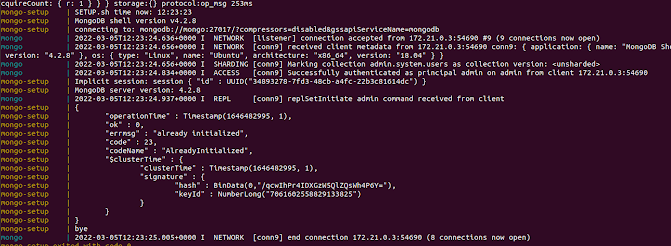
MONGO_REPLICASET_HOST=mongo docker-compose -f src/zeebe-saga-spring-boot/docker/docker-compose-mongo.yaml up


Deploy Microservices

docker-compose  -f src/zeebe-saga-spring-boot/docker/docker-compose-micros.yaml up


Test Microservices Health with Actuator ( status, liveness, readiness)


dhanuka@dhanuka:~$ curl http://localhost:8081/actuator/health | jq '. | {status: .status, liveness: .components.livenessState.status, readiness: .components.readinessState.status,}'   


  % Total    % Received % Xferd  Average Speed   Time    Time     Time  Current

                                 Dload  Upload   Total   Spent    Left  Speed

100   352  100   352    0     0    592      0 --:--:-- --:--:-- --:--:--   593

{

  "status": "UP",

  "liveness": "UP",

  "readiness": "UP"

}


dhanuka@dhanuka:~$ curl http://localhost:8083/actuator/health | jq '. | {status: .status, liveness: .components.livenessState.status, readiness: .components.readinessState.status,}'   


  % Total    % Received % Xferd  Average Speed   Time    Time     Time  Current

                                 Dload  Upload   Total   Spent    Left  Speed

100   352  100   352    0     0    824      0 --:--:-- --:--:-- --:--:--   822

{

  "status": "UP",

  "liveness": "UP",

  "readiness": "UP"

}


dhanuka@dhanuka:~$ curl http://localhost:8084/actuator/health | jq '. | {status: .status, liveness: .components.livenessState.status, readiness: .components.readinessState.status,}'   


  % Total    % Received % Xferd  Average Speed   Time    Time     Time  Current

                                 Dload  Upload   Total   Spent    Left  Speed

100   352  100   352    0     0    675      0 --:--:-- --:--:-- --:--:--   675

{

  "status": "UP",

  "liveness": "UP",

  "readiness": "UP"

}


dhanuka@dhanuka:~$ curl http://localhost:8082/actuator/health | jq '. | {status: .status, liveness: .components.livenessState.status, readiness: .components.readinessState.status,}'   


  % Total    % Received % Xferd  Average Speed   Time    Time     Time  Current

                                 Dload  Upload   Total   Spent    Left  Speed

100   352  100   352    0     0    820      0 --:--:-- --:--:-- --:--:--   822

{

  "status": "UP",

  "liveness": "UP",

  "readiness": "UP"

}


Deploy Zeebe BPMN Process


dhanuka@dhanuka:~$ zbctl deploy workflows/saga-example.bpmn --insecure

{

  "key": "2251799813703663",

  "processes": [

    {

      "bpmnProcessId": "trip-booking",

      "version": 1,

      "processDefinitionKey": "2251799813703662",

      "resourceName": "workflows/saga-example.bpmn"

    }

  ]

}


Create a booking via Rest Call to Booking Microservice


dhanuka@dhanuka:~$ curl --location --request POST 'http://localhost:8081/booking/' \

--header 'Content-Type: application/json' \

--data-raw '{

    "id" : "0",

    "clientId":"123",

    "resourceId":"987",

    "fromDate":"2021-02-22T14:52:44.494264+01:00",

    "toDate":"2021-03-06T14:52:44.495451+01:00",

    "createdAt":"2021-02-10T14:52:44.495469+01:00",

    "active":false

}'


{"id":"0","clientId":"123","houseBookingId":"642c957b-f7ed-45d9-8719-b11fa451dbfa","carBookingId":"dbb44830-2cb6-4c02-ab5d-bf0850e69bb0","flightBookingId":"b573f7ca-cab9-48ab-9bdf-cc08e5e199ae","fromDate":"2021-02-22T13:52:44.494264Z","toDate":"2021-03-06T13:52:44.495451Z","createdAt":"2021-02-10T13:52:44.495469Z","active":false}

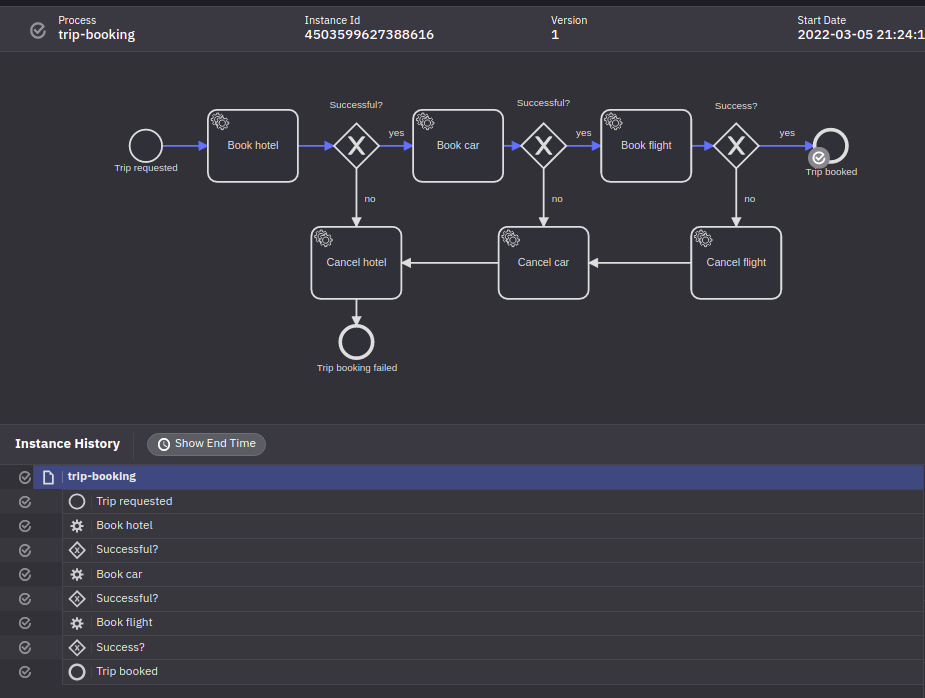
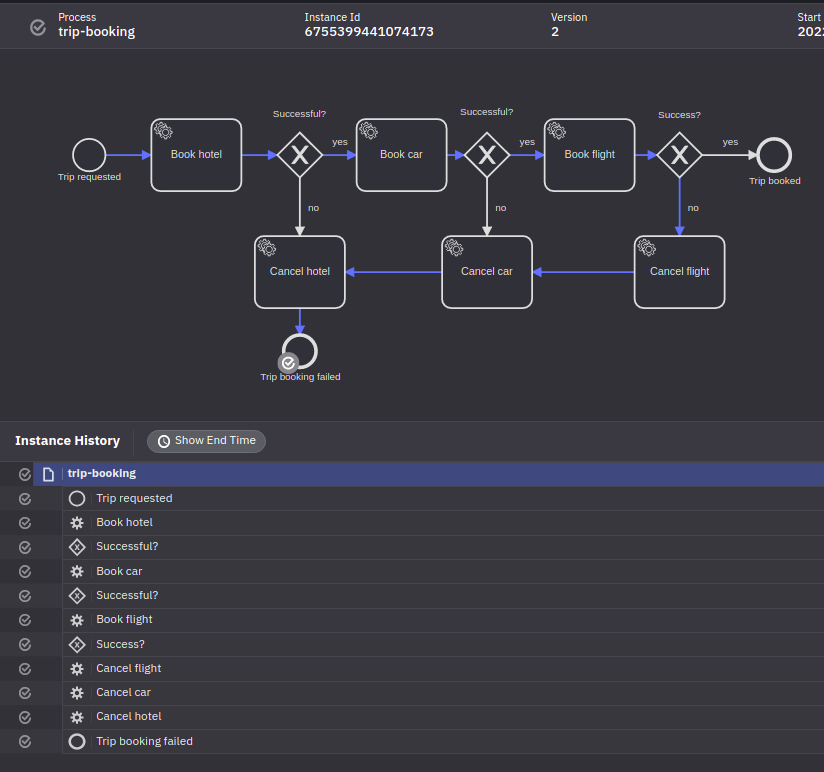
  •  Once you login to Zeebe dashboard via http://localhost:8080/ , you can select the process id (trip-booking) and then version, then you can select the process instance
  • Then you can see the happy path of the work flow.


Java Code Explanation
 

1. Where is Zeebee Process Instance Created?

https://github.com/dhanuka84/SAGA-Microservices-Zeebe/blob/main/src/zeebe-saga-spring-boot/booking-microservice/src/main/java/com/example/booking/service/impl/BookingServiceImpl.java


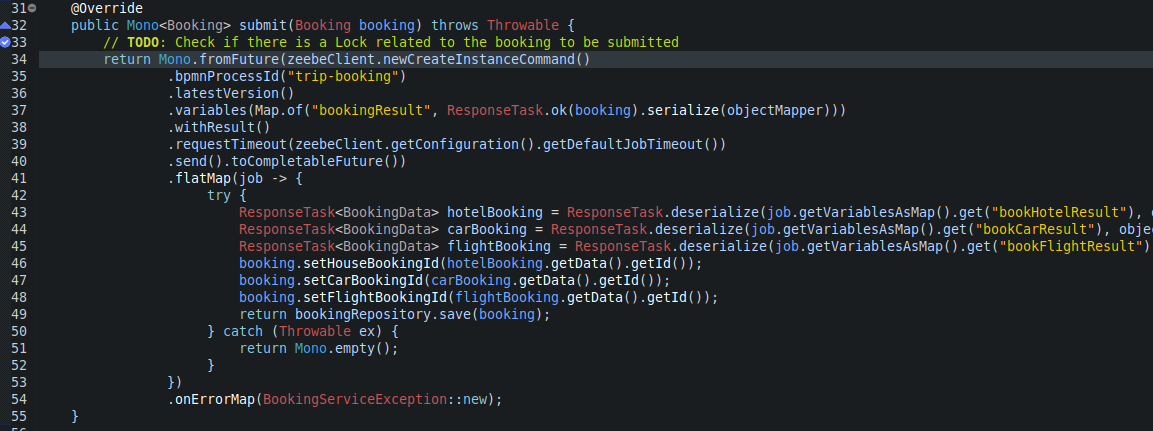
  • As you can see, the instance was created in line 34.

Key Points:

  1. Line 34 : Spring WebFlux, which provides reactive programming support for web applications

https://www.baeldung.com/spring-webflux

  1. Line 37: Creating a variable called bookingResult with Booking data.

  2. Line 40: Usage of Completable Futures.

https://www.callicoder.com/java-8-completablefuture-tutorial/#:~:text=Future%20vs%20CompletableFuture,result%20of%20an%20asynchronous%20computation.

  1. Line 49: Save the Trip Booking entity when received hotel booking id, car booking id and flight booking id.

  2. So all the operations within and outside the microservice will be asynchronous and reactive.


2. Zeebee Task polling/requesting for jobs, then execute and response back to broker.

  • Let’s take Hotel Booking as an example.

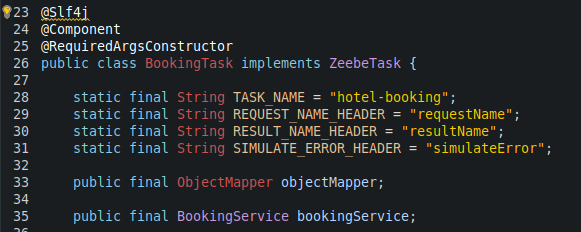
https://github.com/dhanuka84/SAGA-Microservices-Zeebe/blob/main/src/zeebe-saga-spring-boot/hotel-microservice/src/main/java/com/example/hotel/task/BookingTask.java


Key Points:

  1. Line 41,42,43 : Access job data. 

  2. Line 45 : Validate the job based on headers

  3. Line 50: Access Booking Info, based on requestName (bookingResult) variable value, which was created when process instance creation.

  4. Line 64: Create Hotel Booking and reactively update Zeebe with response.

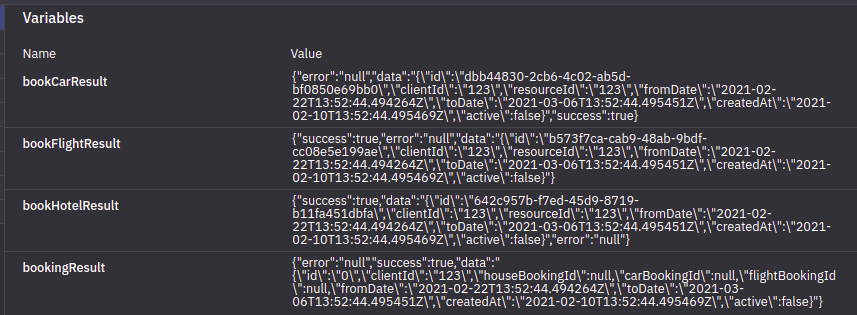
  • Note that now the resultName variable value of response is bookHotelResult.

Failure Path Testing

  • You have to change the BPMN configuration to enable simulateError as below.


Deploy workflow process next version 

dhanuka@dhanuka:~$ zbctl deploy workflows/saga-example.bpmn --insecure

{

  "key": "2251799813703663",

  "processes": [

    {

      "bpmnProcessId": "trip-booking",

      "version": 2,

      "processDefinitionKey": "2251799813703662",

      "resourceName": "workflows/saga-example.bpmn"

    }

  ]

}


Create a booking via Rest Call to Booking Microservice


dhanuka@dhanuka:~$ curl --location --request POST 'http://localhost:8081/booking/' \

--header 'Content-Type: application/json' \

--data-raw '{

    "id" : "0",

    "clientId":"123",

    "resourceId":"987",

    "fromDate":"2021-02-22T14:52:44.494264+01:00",

    "toDate":"2021-03-06T14:52:44.495451+01:00",

    "createdAt":"2021-02-10T14:52:44.495469+01:00",

    "active":false

}'


  • Now you can see the failure path of the workflow 
  • We failed the work flow from Flight Booking task.
  • The failure will be propagated to other tasks which is polling on same instance_id .


Failure Path Java Explanation 


Key Points


1. We have a separate Zeebe task (ex: flight-booking-rollback) to handle failure scenario. This task simply delete relevant booking.

2. Line 45: If the SimulateError true, then this will trigger Failed response to Zeebe.


3. Now according tho BPMN workflow , if BookingFlight Result is not success, then it will call ServiceTask_CancelFlight as target reference.


As you can see ServiceTask_CancelFlight task definition is flight-booking-rollback .


Because of this, there will be a job to execute for flight-booking-rollback  task in Java Class.

4. Now how come this propagate to other Microservices?


In the BPMN configuration , you can see the chain of call from ServiceTask_CancelFlight to ServiceTask_CancelCar and ServiceTask_CancelHotel.

This will helped to create rollback jobs for other Microservices rollback tasks.


Some inspirational videos :)


2/14/2022

AWS EKS Security : Traffic Control


The purpose of this post is give high level overview about how to achieve security aspect of traffic controls in AWS EKS .

As seen in the above diagram, AWS EKS is a managed service, which means responsibility of control plane is part of AWS while components in the worker nodes are users/customers.

It's a shared responsibility model.

There are couple of ways, that we can control incoming and outgoing traffic to/from EKS cluster.

Cluster VPC and subnet considerations


There are couple of ways to setup a VPC and subnets.

1. Public and private subnets 
2. Only public subnets 
3. Only private subnets 

Out of these, option one is the famous VPC and subnect setup for EKS cluster.
This way we can deploy webservices in public subnets while backend services in private subnets.


Enable External SNAT (source network address translation)


By enabling external SNAT, EKS CNI implementation do not perform SNAT, and rely on whatever egress solution like, VPC NAT Gateway to do it for you

This is ideal for pods deployed in public subnets.


https://medium.com/swlh/what-to-know-before-using-amazon-eks-3b32cc64f131


AWS Security Groups & NACL


  • Security group is the firewall of EC2 Instances.
  • Network ACL is the firewall of the VPC Subnets.


https://medium.com/awesome-cloud/aws-difference-between-security-groups-and-network-acls-adc632ea29ae


Pod Security Groups


With this, we can apply same security groups rules to inbound and outbound network traffic of pods in EC2 instance/node

apiVersion: vpcresources.k8s.aws/v1beta1
kind: SecurityGroupPolicy
metadata:
  name: my-security-group-policy
  namespace: my-namespace
spec:
  podSelector: 
    matchLabels:
      role: my-role
  securityGroups:
    groupIds:
      - sg-abc123


https://docs.aws.amazon.com/eks/latest/userguide/security-groups-for-pods.html


Network Policies


If you want to control traffic flow at the IP address or port level (OSI layer 3 or 4), then you might consider using Kubernetes NetworkPolicies for particular applications in your cluster

This is Kubernetes way of applying compliance and rules for network traffic within the cluster.

https://github.com/ahmetb/kubernetes-network-policy-recipes

Securing Cluster Networking with Network Policies - Ahmet Balkan, Google


Upgrade core add-ons

  1. kubeproxy
2. CoreDNS

It is always a best practice to upgrade these add-ons.

By doing this we can use latest traffic control related features.

eksctl utils update-kube-proxy --cluster=eksworkshop-eksctl --approve

eksctl utils update-coredns --cluster=eksworkshop-eksctl --approve

https://www.eksworkshop.com/intermediate/320_eks_upgrades/upgradeaddons/