Showing posts with label kafka connect. Show all posts

5/25/2018

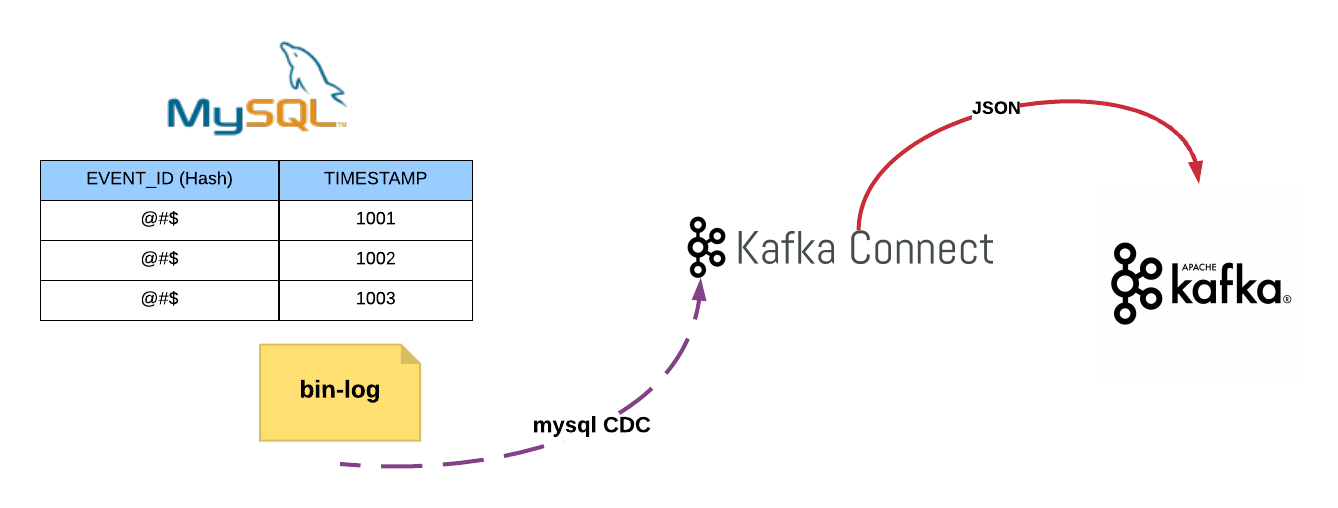
MySql Change Data Capturing With Kafka Connect


Software & tools you need to setup

      1. Install MySql 5.7 in your local machine.
    2. JDK 1.8
    3. Maven
    4. Confluent platform 3.2.2
    5. Download below JARs from maven repository  (https://mvnrepository.com/artifact)     

debezium-core-0.5.2.jar,
debezium-connector-mysql-0.5.2.jar,
mysql-binlog-connector-java-0.9.2.jar ,
mysql-connector-java-5.1.40.jar,
protobuf-java-2.6.1.jar, wkb-1.0.2.jar

Steps: 

1. Enable bin-log in mysql and create database and table in mysql

  • Go to /etc/mysql/mysql.conf.d folder
Open and add below lines to mysqld.cnf file

#bin logs
server-id         = 223344
log_bin           = mysql-bin
binlog_format     = row
binlog_row_image  = full
expire_logs_days  = 1
log-bin-index     = bin-log.index

Restart mysql

$ /etc/init.d/mysql stop
$ /etc/init.d/mysql start

Create mysql db and table

$ mysql -u root -p root

mysql> create database eventsource;
mysql>  DROP TABLE IF EXISTS `CMDB_TAG`;
CREATE TABLE `CMDB_TAG` (
 `VERSION` bigint(20) DEFAULT NULL,
 `TAG_KEY` varchar(255),
 `TAG_VALUE` varchar(255),
 PRIMARY KEY (`TAG_KEY`, `TAG_VALUE`)
) ENGINE=InnoDB DEFAULT CHARSET=latin1;

2. Create mysql user with proper privileges


$ mysql -u root -p root

mysql>  GRANT SELECT, RELOAD, SHOW DATABASES, REPLICATION SLAVE, REPLICATION CLIENT ON *.* TO 'debezium' IDENTIFIED BY 'dbz';

3. Start Zookeeper


$ cd  ~/software/confluent-3.2.2


confluent-3.2.2$ nohup ./bin/zookeeper-server-start ./etc/kafka/zookeeper.properties &

4. Start Kafka


confluent-3.2.2$ nohup ./bin/kafka-server-start ./etc/kafka/server.properties > kafka.log 2>&1 &

Create kafka topic named events

confluent-3.2.2$ bin/kafka-topics  --create --zookeeper localhost:2181 --replication-factor 3 --partitions 6 --topic  events --config min.insync.replicas=2 --config unclean.leader.election.enable=false

5.  Setup mysql kafka connector


Create directory called kafka-connect-cdc within confluent

confluent-3.2.2$ cd share/java
$ mkdir kafka-connect-cdc

Rename debezium-connector-mysql-0.5.2.jar as kafka-connect-cdc.jar

$ mv debezium-connector-mysql-0.5.2.jar as kafka-connect-cdc.jar

Copy all the downloaded jar into kafka-connect-cdc directory

confluent-3.2.2/share/java/kafka-connect-cdc$ ls
debezium-core-0.5.2.jar  kafka-connect-cdc.jar mysql-binlog-connector-java-0.9.2.jar  mysql-connector-java-5.1.40.jar protobuf-java-2.6.1.jar wkb-1.0.2.jar

Configure Connector

Go to etc folder

$ cd etc

Create directory called kafka-connect-cdc

$ mkdir kafka-connect-cdc

Create property file called kafka-connect-cdc.properties
$ touch kafka-connect-cdc.properties

Copy below content to kafka-connect-cdc.properties file

name=mysql-source
connector.class=io.debezium.connector.mysql.MySqlConnector
database.hostname=localhost
database.port=3306
database.user=debezium
database.password=dbz
server.id=223344
database.server.name=eventsource
database.history.kafka.bootstrap.servers=localhost:9092
database.whitelist=eventsource
database.history.kafka.topic=events
tasks.max=10

Start mysql cdc connector

confluent-3.2.2$  nohup ./bin/connect-standalone etc/kafka/connect-standalone.properties  etc/kafka-connect-cdc/kafka-connect-cdc.properties > jdbc.log 2>&1 &

6. List Kafka topics


confluent-3.2.2$ bin/kafka-topics --zookeeper localhost:2181 --list

__consumer_offsets
events
eventsource
eventsource.eventsource.CMDB_TAG 
  • You can see that connector has created, two topics which is highlighted in yellow color.

7. Consume JSON messages from Kafka


confluent-3.2.2$ bin/kafka-console-consumer --bootstrap-server localhost:9092 --topic eventsource.eventsource.CMDB_TAG

8. Testing the Connector


Do some CRUD operation on table that we have created

mysql> use eventsource;
mysql> insert into CMDB_TAG (VERSION,TAG_KEY,TAG_VALUE) values(0,'TEST4','TEST1');


update CMDB_TAG set VERSION = 1 where TAG_KEY = 'TEST4' and TAG_VALUE = 'TEST1';


delete from CMDB_TAG where TAG_KEY = 'TEST4' and TAG_VALUE = 'TEST1';

From Kafka consumer console you can see following JSON messages.

{"schema":{"type":"struct","fields":[{"type":"struct","fields":[{"type":"int64","optional":true,"field":"VERSION"},{"type":"string","optional":false,"field":"TAG_KEY"},{"type":"string","optional":false,"field":"TAG_VALUE"}],"optional":true,"name":"eventsource.eventsource.CMDB_TAG.Value","field":"before"},{"type":"struct","fields":[{"type":"int64","optional":true,"field":"VERSION"},{"type":"string","optional":false,"field":"TAG_KEY"},{"type":"string","optional":false,"field":"TAG_VALUE"}],"optional":true,"name":"eventsource.eventsource.CMDB_TAG.Value","field":"after"},{"type":"struct","fields":[{"type":"string","optional":false,"field":"name"},{"type":"int64","optional":false,"field":"server_id"},{"type":"int64","optional":false,"field":"ts_sec"},{"type":"string","optional":true,"field":"gtid"},{"type":"string","optional":false,"field":"file"},{"type":"int64","optional":false,"field":"pos"},{"type":"int32","optional":false,"field":"row"},{"type":"boolean","optional":true,"field":"snapshot"},{"type":"int64","optional":true,"field":"thread"},{"type":"string","optional":true,"field":"db"},{"type":"string","optional":true,"field":"table"}],"optional":false,"name":"io.debezium.connector.mysql.Source","field":"source"},{"type":"string","optional":false,"field":"op"},{"type":"int64","optional":true,"field":"ts_ms"}],"optional":false,"name":"eventsource.eventsource.CMDB_TAG.Envelope","version":1},"payload":{"before":null,"after":{"VERSION":0,"TAG_KEY":"TEST4","TAG_VALUE":"TEST1"},"source":{"name":"eventsource","server_id":223344,"ts_sec":1527283334,"gtid":null,"file":"mysql-bin.000003","pos":1984,"row":0,"snapshot":null,"thread":5,"db":"eventsource","table":"CMDB_TAG"},"op":"c","ts_ms":1527283334083}}
 
{"schema":{"type":"struct","fields":[{"type":"struct","fields":[{"type":"int64","optional":true,"field":"VERSION"},{"type":"string","optional":false,"field":"TAG_KEY"},{"type":"string","optional":false,"field":"TAG_VALUE"}],"optional":true,"name":"eventsource.eventsource.CMDB_TAG.Value","field":"before"},{"type":"struct","fields":[{"type":"int64","optional":true,"field":"VERSION"},{"type":"string","optional":false,"field":"TAG_KEY"},{"type":"string","optional":false,"field":"TAG_VALUE"}],"optional":true,"name":"eventsource.eventsource.CMDB_TAG.Value","field":"after"},{"type":"struct","fields":[{"type":"string","optional":false,"field":"name"},{"type":"int64","optional":false,"field":"server_id"},{"type":"int64","optional":false,"field":"ts_sec"},{"type":"string","optional":true,"field":"gtid"},{"type":"string","optional":false,"field":"file"},{"type":"int64","optional":false,"field":"pos"},{"type":"int32","optional":false,"field":"row"},{"type":"boolean","optional":true,"field":"snapshot"},{"type":"int64","optional":true,"field":"thread"},{"type":"string","optional":true,"field":"db"},{"type":"string","optional":true,"field":"table"}],"optional":false,"name":"io.debezium.connector.mysql.Source","field":"source"},{"type":"string","optional":false,"field":"op"},{"type":"int64","optional":true,"field":"ts_ms"}],"optional":false,"name":"eventsource.eventsource.CMDB_TAG.Envelope","version":1},"payload":{"before":{"VERSION":0,"TAG_KEY":"TEST4","TAG_VALUE":"TEST1"},"after":{"VERSION":1,"TAG_KEY":"TEST4","TAG_VALUE":"TEST1"},"source":{"name":"eventsource","server_id":223344,"ts_sec":1527283762,"gtid":null,"file":"mysql-bin.000003","pos":2279,"row":0,"snapshot":null,"thread":5,"db":"eventsource","table":"CMDB_TAG"},"op":"u","ts_ms":1527283762079}}
{"schema":{"type":"struct","fields":[{"type":"struct","fields":[{"type":"int64","optional":true,"field":"VERSION"},{"type":"string","optional":false,"field":"TAG_KEY"},{"type":"string","optional":false,"field":"TAG_VALUE"}],"optional":true,"name":"eventsource.eventsource.CMDB_TAG.Value","field":"before"},{"type":"struct","fields":[{"type":"int64","optional":true,"field":"VERSION"},{"type":"string","optional":false,"field":"TAG_KEY"},{"type":"string","optional":false,"field":"TAG_VALUE"}],"optional":true,"name":"eventsource.eventsource.CMDB_TAG.Value","field":"after"},{"type":"struct","fields":[{"type":"string","optional":false,"field":"name"},{"type":"int64","optional":false,"field":"server_id"},{"type":"int64","optional":false,"field":"ts_sec"},{"type":"string","optional":true,"field":"gtid"},{"type":"string","optional":false,"field":"file"},{"type":"int64","optional":false,"field":"pos"},{"type":"int32","optional":false,"field":"row"},{"type":"boolean","optional":true,"field":"snapshot"},{"type":"int64","optional":true,"field":"thread"},{"type":"string","optional":true,"field":"db"},{"type":"string","optional":true,"field":"table"}],"optional":false,"name":"io.debezium.connector.mysql.Source","field":"source"},{"type":"string","optional":false,"field":"op"},{"type":"int64","optional":true,"field":"ts_ms"}],"optional":false,"name":"eventsource.eventsource.CMDB_TAG.Envelope","version":1},"payload":{"before":{"VERSION":1,"TAG_KEY":"TEST4","TAG_VALUE":"TEST1"},"after":null,"source":{"name":"eventsource","server_id":223344,"ts_sec":1527283970,"gtid":null,"file":"mysql-bin.000003","pos":2596,"row":0,"snapshot":null,"thread":5,"db":"eventsource","table":"CMDB_TAG"},"op":"d","ts_ms":1527283970341}}
{"schema":null,"payload":null}
  • I have highlighted the db operations in pink color.
  • Also once we delete a record we have received last JSON, which is highlighted in green.


References:


5/20/2018

Event Sourcing for Micro Services


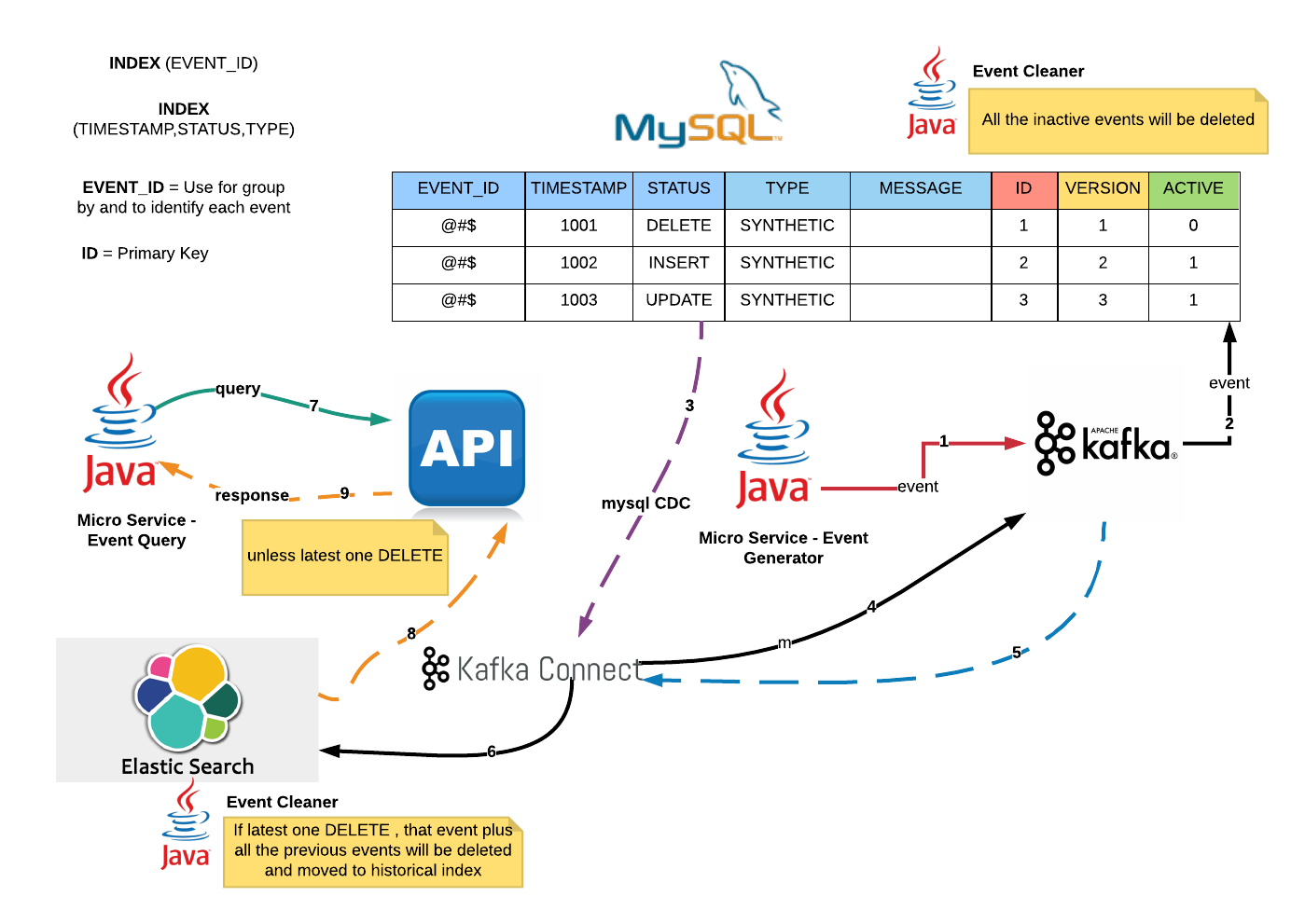
This is a hypothetical & high level architecture for Event Sourcing.

Key Architectural Considerations

1. Beyond Eventual Consistency.
2. Asynchronous.
3. Command Query Responsibility Segregation (CQRS).
4. Fault tolerant & Fail safe
5. Scalability.
6. Zero event lost & Exactly once.

Brief Explanation.

1. Micro-services application will publish events to Kafka.
2. Kafka consumer (sink connector) will consume and insert into Mysql Event Source table within a transactional context.
3. Mysql Change Data Capture (source connector) which runs within Kafka Connect will detect changes.
4. Kafka source connector will transform events and publish to Kafka.
5. Kafka connect will consume events from Kafka.
6. Elasticsearch sink connector will insert events into ES and update relevant MySql record activeness within transactional context.
7. Micro-Service query data from API.
8 & 9. API return latest data unless it's an DELETE event.

Events Cleaning

1. There are schedulers to clean/delete both MySQL and ES active index.
2. All the events will be rest in historical index.
3. MySQL events will be partitioned based on it's activeness.

4/06/2017

Replicate Table Data from MySQL to Kafka


Steps

1. Download and install Confluent 3.2.0

2. cd  ~/software/confluent-3.2.0

3.  Start Zookeeper

nohup ./bin/zookeeper-server-start ./etc/kafka/zookeeper.properties &

4. Start Kafka

nohup ./bin/kafka-server-start ./etc/kafka/server.properties > kafka.log 2>&1 &

5. Create & Configure JDBC connector properties

touch etc/kafka-connect-jdbc/source-mysql.properties
vim etc/kafka-connect-jdbc/source-mysql.properties

name=mysql-source
connector.class=io.confluent.connect.jdbc.JdbcSourceConnector
tasks.max=10

connection.url=jdbc:mysql://localhost:3306/hibernateDB?user=root&password=root
mode=bulk
#mode=timestamp+incrementing
#timestamp.column.name=modified
#incrementing.column.name=id

topic.prefix=mysql


6. Copy mysql driver to kafka connect

cp mysql-connector-java-5.1.40.jar share/java/kafka-connect-jdbc/

7. Start JDBC Source Connector

nohup ./bin/connect-standalone etc/kafka/connect-standalone.properties  etc/kafka-connect-jdbc/source-mysql.properties  > jdbc.log 2>&1 &


Verify

mysql> show tables;
+-----------------------+
| Tables_in_hibernateDB |
+-----------------------+
| LOCATION              |
| PRODUCT               |
| TEST                  |
| TEST_LOCATION         |
+-----------------------+


mysql> desc LOCATION;
+---------------+--------------+------+-----+---------+----------------+
| Field         | Type         | Null | Key | Default | Extra          |
+---------------+--------------+------+-----+---------+----------------+
| ID            | bigint(20)   | NO   | PRI | NULL    | auto_increment |
| VERSION       | bigint(20)   | NO   |     | NULL    |                |
| LOCATION_NAME | varchar(255) | NO   | UNI | NULL    |                |
+---------------+--------------+------+-----+---------+----------------+


List Down topics
bin/kafka-topics --list --zookeeper localhost:2181

mysqlLocation
mysqlProduct
mysqlTest
mysqlTest_Location

View Topic Messages 
 
./bin/kafka-console-consumer  --zookeeper localhost:2181 --from-beginning --topic mysqlLocation

{"schema":{"type":"struct","fields":[{"type":"int64","optional":false,"field":"ID"},{"type":"int64","optional":false,"field":"VERSION"},{"type":"string","optional":false,"field":"LOCATION_NAME"}],"optional":false,"name":"LOCATION"},"payload":{"ID":2,"VERSION":0,"LOCATION_NAME":"Denver"}}
{"schema":{"type":"struct","fields":[{"type":"int64","optional":false,"field":"ID"},{"type":"int64","optional":false,"field":"VERSION"},{"type":"string","optional":false,"field":"LOCATION_NAME"}],"optional":false,"name":"LOCATION"},"payload":{"ID":4,"VERSION":0,"LOCATION_NAME":"Boston"}}


3/25/2017

Kafka Connect Architecture


  • Please note here I am using confluent platform. So please go to confluent installation directory and run below kafka related commands. For example mine:

/home/xxx/software/confluent-3.0.0


Steps to follow:


1. Start ElasticSearch

$ cd ~/software/elasticsearch-2.3.4/

./bin/elasticsearch

2. Start Zookeeper
nohup ./bin/zookeeper-server-start ./etc/kafka/zookeeper.properties &

3. Start Kafka
nohup ./bin/kafka-server-start ./etc/kafka/server.properties > kafka.log 2>&1 &

4. Start Standalone Source connector
nohup ./bin/connect-standalone etc/kafka/connect-standalone.properties etc/kafka/connect-socket-source.properties  > socket.log 2>&1 &
5. Start Distributed Sink connector
nohup ./bin/connect-distributed etc/kafka/connect-distributed.properties  > connect.log 2>&1 &
6. Create topics names event_topic and metric_topic
bin/kafka-topics --create --zookeeper localhost:2181 --replication-factor 1 --partitions 2 --topic event_topic

bin/kafka-topics --create --zookeeper localhost:2181 --replication-factor 1 --partitions 2 --topic metric_topic

7. List down created topics
bin/kafka-topics --list --zookeeper localhost:2181

8. Start console consumer to verify source connector workflow
./bin/kafka-console-consumer  --zookeeper localhost:2181 --from-beginning --topic event_topic

9. Create index called “event_topic” in ElasticSearch
$ curl -XPUT 'http://localhost:9200/event_topic/' -d '{
   "settings" : {
       "number_of_shards" : 3,
       "number_of_replicas" : 2
   }
}'
10. Just in case if you want to delete topics

bin/kafka-topics --delete --zookeeper localhost:2181 --topic EVENT_TOPIC

bin/kafka-topics --delete --zookeeper localhost:2181 --topic METRIC_TOPIC
11. Create sink connector through rest service

curl -X POST -H "Content-Type: application/json" --data '{"name": "elasticsearch-sink", "config": {"connector.class":"io.confluent.connect.elasticsearch.ElasticsearchSinkConnector", "tasks.max":"2","batch.size":1,"key.ignore":"true","connection.url":"http://localhost:9200","topics":"socket-test,event_topic,metric_topic","schema.ignore":"true","topic.index.map":"event_topic:event_topic,metric_topic:metric_topic","linger.ms":1000,"topic.schema.ignore":"event_topic,metric_topic" }}’ http://localhost:8084/connectors
12. Reconfigure sink connector on the fly.


curl -X PUT -H "Content-Type: application/json" --data '{"connector.class":"io.confluent.connect.elasticsearch.ElasticsearchSinkConnector", "tasks.max":"2","batch.size":1,"key.ignore":"true","connection.url":"http://localhost:9200","topics":"socket-test,event_topic,metric_topic","schema.ignore":"true","topic.index.map":"event_topic:event_topic,metric_topic:metric_topic","linger.ms":1000,"topic.schema.ignore":"event_topic,metric_topic","type.name":"kafka-connect" }’ http://localhost:8085/connectors/elasticsearch-sink/config

13. Create Source connector


curl -X POST -H "Content-Type: application/json" --data '{"name": "socket-connector", "config": {"connector.class":"org.apache.kafka.connect.socket.SocketSourceConnector", "tasks.max":"4", "topic":"socket-test", "schema.name":"socketschema","type.name":"kafka-connect","schema.ignore":"true", "port":"12345", "batch.size":"2" }}' http://localhost:8084/connectors

14. Reconfigure Source connector on the fly


curl -X PUT -H "Content-Type: application/json" --data '{"connector.class":"org.apache.kafka.connect.socket.SocketSourceConnector",
"tasks.max":"4", "topics":"socket-test",
"schema.name":"socketschema",
"type.name":"kafka-connect",
"schema.ignore":"true",
"tcp.port":"12345",
"batch.size":"2",
"metrics_id":"domain",
"metrics_domains":"",
"events_domains":"",
"domain_topic_mapping":"event_sum:event_topic,metric_rum:metric_topic",
"error_topic":"error_topic"

15. Send a sample json message

cat samplejson | netcat localhost 12345

16. Verify json message from ElasticSearch


17. Kafka Connect configuration

Connect-distributed.properties

##
# Licensed to the Apache Software Foundation (ASF) under one or more
# contributor license agreements.  See the NOTICE file distributed with
# this work for additional information regarding copyright ownership.
# The ASF licenses this file to You under the Apache License, Version 2.0
# (the "License"); you may not use this file except in compliance with
# the License.  You may obtain a copy of the License at
#
#    http://www.apache.org/licenses/LICENSE-2.0
#
# Unless required by applicable law or agreed to in writing, software
# distributed under the License is distributed on an "AS IS" BASIS,
# WITHOUT WARRANTIES OR CONDITIONS OF ANY KIND, either express or implied.
# See the License for the specific language governing permissions and
# limitations under the License.
##

# These are defaults. This file just demonstrates how to override some settings.
bootstrap.servers=localhost:9092

# unique name for the cluster, used in forming the Connect cluster group. Note that this must not conflict with consumer group IDs
group.id=connect-cluster

# The converters specify the format of data in Kafka and how to translate it into Connect data. Every Connect user will
# need to configure these based on the format they want their data in when loaded from or stored into Kafka
key.converter=org.apache.kafka.connect.storage.StringConverter
value.converter=org.apache.kafka.connect.storage.StringConverter

#key.converter=io.confluent.connect.avro.AvroConverter
#value.converter=io.confluent.connect.avro.AvroConverter
# Converter-specific settings can be passed in by prefixing the Converter's setting with the converter we want to apply
# it to
key.converter.schemas.enable=false
value.converter.schemas.enable=false

# The internal converter used for offsets and config data is configurable and must be specified, but most users will
# always want to use the built-in default. Offset and config data is never visible outside of Kafka Connect in this format.
internal.key.converter=org.apache.kafka.connect.json.JsonConverter
internal.value.converter=org.apache.kafka.connect.json.JsonConverter
internal.key.converter.schemas.enable=false
internal.value.converter.schemas.enable=false

# Topic to use for storing offsets. This topic should have many partitions and be replicated.
offset.storage.topic=connect-offsets

# Topic to use for storing connector and task configurations; note that this should be a single partition, highly replicated topic.
# You may need to manually create the topic to ensure single partition for the config topic as auto created topics may have multiple partitions.
config.storage.topic=connect-configs

# Topic to use for storing statuses. This topic can have multiple partitions and should be replicated.
status.storage.topic=connect-status

# Flush much faster than normal, which is useful for testing/debugging
offset.flush.interval.ms=10000
rest.port=8085


Connect-standalone.properties

# Licensed to the Apache Software Foundation (ASF) under one or more
# contributor license agreements.  See the NOTICE file distributed with
# this work for additional information regarding copyright ownership.
# The ASF licenses this file to You under the Apache License, Version 2.0
# (the "License"); you may not use this file except in compliance with
# the License.  You may obtain a copy of the License at
#
#    http://www.apache.org/licenses/LICENSE-2.0
#
# Unless required by applicable law or agreed to in writing, software
# distributed under the License is distributed on an "AS IS" BASIS,
# WITHOUT WARRANTIES OR CONDITIONS OF ANY KIND, either express or implied.
# See the License for the specific language governing permissions and
# limitations under the License.

# These are defaults. This file just demonstrates how to override some settings.
bootstrap.servers=localhost:9092

# The converters specify the format of data in Kafka and how to translate it into Connect data. Every Connect user will
# need to configure these based on the format they want their data in when loaded from or stored into Kafka
#key.converter=org.apache.kafka.connect.json.JsonConverter
#value.converter=org.apache.kafka.connect.json.JsonConverter

key.converter=org.apache.kafka.connect.storage.StringConverter
value.converter=org.apache.kafka.connect.storage.StringConverter

#key.converter=org.apache.kafka.connect.json.JsonConverter
#value.converter=org.apache.kafka.connect.json.JsonConverter
# Converter-specific settings can be passed in by prefixing the Converter's setting with the converter we want to apply
# it to
key.converter.schemas.enable=false
value.converter.schemas.enable=false

# The internal converter used for offsets and config data is configurable and must be specified, but most users will
# always want to use the built-in default. Offset and config data is never visible outside of Kafka Connect in this format.
internal.key.converter=org.apache.kafka.connect.json.JsonConverter
internal.value.converter=org.apache.kafka.connect.json.JsonConverter
internal.key.converter.schemas.enable=false
internal.value.converter.schemas.enable=false

offset.storage.file.filename=/tmp/connect.offsets
# Flush much faster than normal, which is useful for testing/debugging
offset.flush.interval.ms=10000
rest.port=8084