4/09/2019


4/07/2019
2/09/2019
Rule Execution as Streaming Process with Flink

As explained in the above diagram, rule creator (Desktop) will create JSON based rule and push them to Kafka (rule topic). Event Source will send events to Kafka (testin topic). Finally Flink will consume both rules and events as streams and process rules based on key (Driver Id). Rules will be stored in Flink as in-memory collection and the rules also can be updated in same manner. Finally out put result will be send to Kafka (testout topic).
Setup Flink
- Download Apache Flink 1.6.3 from below location and extract archive file.
https://www.apache.org/dyn/closer.lua/flink/flink-1.6.3/flink-1.6.3-bin-scala_2.11.tgz
- Download below dependancy jar files and place in flink-1.6.3/lib folder.

- Configure Flink with flink-1.6.3/conf/flink-conf.yaml .
Change job-manager and task-manager heap size to much smaller size.
jobmanager.heap.size: 1g
taskmanager.heap.size: 2g
taskmanager.numberOfTaskSlots: 20
- Change State Backend to RocksDB
Create folder from you home location
~$ mkdir -p data/flink/checkpoints
Edit configuration
state.backend: rocksdb
state.checkpoints.dir: file:///home/dhanuka/data/flink/checkpoints
- Start Flink cluster in standalone mode.
:~/software/flink-1.6.3$ ./bin/start-cluster.sh
Setup Kafka & Zookeeper
- In here I am using docker and docker compose so you can follow below blogspost to install docker & docker-compose in ubuntu.
http://dhanuka84.blogspot.com/2019/02/install-docker-in-ubuntu.html
- Please checkout below docker project from github.
https://github.com/dhanuka84/my-docker.git
- Change IP address to your machine IP address.
https://github.com/dhanuka84/my-docker/blob/master/kafka/kafka-hazelcast.yml
- Bootup Kafka and Zookeeper with docker-compose
- Check docker containers

- Create Kafka Topics
Download Confluent Platform - https://www.confluent.io/download/
- Got to confluent platform extracted location and run below commands
bin/kafka-topics --create --zookeeper localhost:2181 --replication-factor 1 --partitions 6 --topic testin
bin/kafka-topics --create --zookeeper localhost:2181 --replication-factor 1 --partitions 6 --topic testout
bin/kafka-topics --create --zookeeper localhost:2181 --replication-factor 1 --partitions 6 --topic rule
Create Java based Rule Job
- Checkout the project from github and build the project with maven.
https://github.com/dhanuka84/stream-analytics
stream-analytics$ mvn clean install -Dmaven.test.skip=true
Please note that both rules and events filter by key.
KeyedStream<Event, String> filteredEvents = events.keyBy(Event::getDriverID);
rules.broadcast().keyBy(Rule::getDriverID)
Store rules in ListState using flatMap1 method.
Execute rule against each relevant event using flatMap2 method.
Finally results transform to JSON string.
- Prepare flat jar to upload, using below command within checked out project home.
stream-analytics$ jar uf target/stream-analytics-0.0.1-SNAPSHOT.jar application.properties consumer.properties producer.properties
- Upload Flink Job Jar file
copy stream-analytics-0.0.1-SNAPSHOT.jar Flink home folder and run below command
Testing
- Run Producer.java class using your favorite IDE. This will generate both events and rules then publish to Kafka.
- To verify from Kafka level use below commands within confluent home location.
Get offset
bin/kafka-run-class kafka.tools.GetOffsetShell --broker-list localhost:9092 --topic testout --time -1
Read from Kafka topic
bin/kafka-console-consumer --bootstrap-server localhost:9092 --topic testout
2/08/2019
Install docker in Ubuntu
1. Go to below link
2. Download below debian installations
3. Install using below command
4. Download docker-compose
5. Make docker-compose executable
6. Check Versions
7. Check whether docker running
8. Use Docker as normal user
https://download.docker.com/linux/ubuntu/dists/xenial/pool/stable/amd64/
2. Download below debian installations
docker-ce-cli_18.09.1_3-0_ubuntu-xenial_amd64.deb
containerd.io_1.2.2-1_amd64.deb
docker-ce_18.09.1_3-0_ubuntu-xenial_amd64.deb
3. Install using below command
sudo dpkg -i /path/to/package.deb4. Download docker-compose
curl -L https://github.com/docker/compose/releases/download/1.23.2/docker-compose-`uname -s`-`uname -m` -o /usr/local/bin/docker-compose
5. Make docker-compose executable
sudo chmod +x /usr/local/bin/docker-compose
6. Check Versions
docker --versiondocker-compose --version
7. Check whether docker running
service docker status
8. Use Docker as normal user
sudo systemctl stop docker
sudo usermod -aG docker ${USER}su - ${USER}sudo systemctl start dockersudo systemctl enable docker
11/24/2018
Elasticsearch : Factors Need To Consider To Get Rid Of From OOM
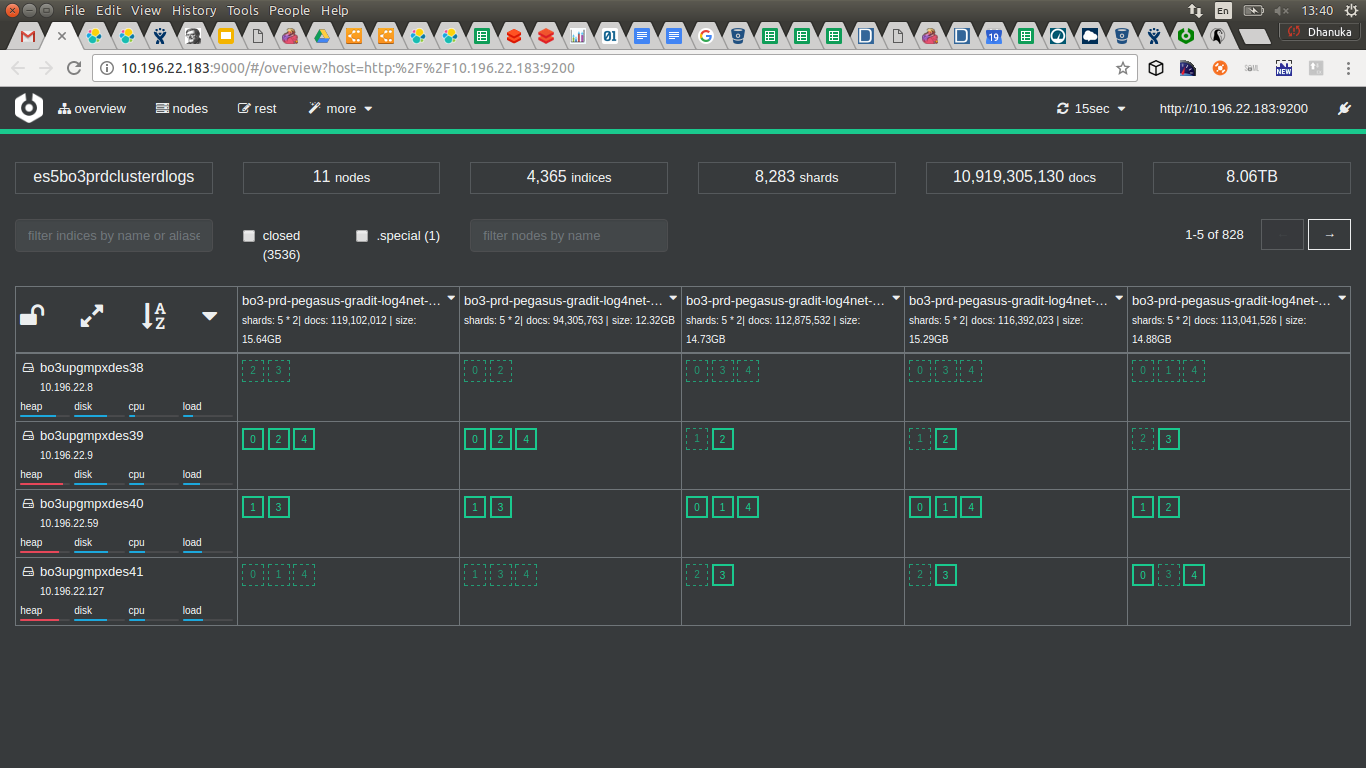
We used Elasticsearch as centralize logging system for multiple products.
Observations:
1. 8283 primary shards
2. 10 Billion documents
3. 8.06 TB of data in each data node
4. 4365 indices
5. Five primary shards per index
6. Four Data Nodes
7. Three out of four data nodes heap memory in critical state.
Identified drawbacks
- Use daily index creation for even 1GB size indexes.
- The default primary shard count for every index is 5.
- For 12 different indices, number of primary shards will be as follows.
(primary shard per index) * 12 (number of indexes/ products) * 30 (days per month) = 1800
(3 months) 1800 * 3 = 5400
(6 months) 1800 * 6 = 10800
Improvements
Use monthly index creation or create index more configurable manner based on the primary shard size.
Note: According to Elastic , recommended size of a primary shard is 30GB - 40GB (depend on network bandwidth)
number of shards per node below 20 to 25 per GB (roughly each primary shard cost 40 MB of heap memory)
5 * 6 * 11 + 5 * 30 = 480 (No of primary shards count)
Improvement = 10800/480 = 22.5 times
Clear some misunderstanding
According to Elastic these are the ratio between RAM & Storage for two main purposes (reading & writing).
For memory-intensive search workloads, more RAM (less storage) can improve performance. Use high-performance SSDs drives
For memory-intensive search workloads, more RAM (less storage) can improve performance. Use high-performance SSDs drives
and a RAM-to-storage ratio for users of 1:16 (or even 1:8). For example, if you use a ratio of 1:16, a cluster with 4GB of RAM will
get 64GB of storage allocated to it.
For logging workloads, more storage space can be more cost effective. Use a RAM-to-storage ratio of 1:48 to 1:96, as data sizes are
typically much larger compared to the RAM needed for logging. A cost effective solution might be to step down from SSDs to spinning
media, such as high-performance server disks. For example, if you use a ratio of 1:96, a cluster with 4GB of RAM will get 384 of
storage allocated to it.
If we take one of our ES based centralize Logs cluster in production it’s working fine for 8.5 TB data just for 25GB RAM in data nodes.
So according to Logs Cluster, RAM to Disk ratio is as 1:348. Also when we check number of primary shards it’s > 7000 .
So according to Logs Cluster, RAM to Disk ratio is as 1:348. Also when we check number of primary shards it’s > 7000 .
How can this happen, so Logs even work with less RAM??
Highest contribution made by one of the product logs, roughly daily index size is 30 GB. Most of other products generate less than
2 GB size of daily indexes.
2 GB size of daily indexes.
As we all know , the Logs Cluster query load is really low compared to logs writing frequency.Having said that , If we take biggest
logs contribution product logs writing frequency it’s
logs contribution product logs writing frequency it’s
something around 600 per second.
This is really low log writing load. According to my understanding normal workload should be 10000 per second.
So Elastic give recommendation keeping these workloads in mind, where our case this is really low situation and that’s why we still
can live with current RAM to Storage ratio.
So Elastic give recommendation keeping these workloads in mind, where our case this is really low situation and that’s why we still
can live with current RAM to Storage ratio.
References:
7/15/2018
Short Notes: Design Principles & Patterns
History
The book called “A Pattern Language”[1] by C.Alexander is the fundamental reference for the book named “Design Patterns (GoF)”, which is generally accepted as the standard in building software.
[1] https://en.wikipedia.org/wiki/A_Pattern_Language
A pattern language [2] is a method of describing good design practices or patterns of useful organization within a field of expertise.
[2] https://en.wikipedia.org/wiki/Pattern_language
Architectural Concepts
Envision - Examine stakeholder goals combined with architect’s expertise.
Model - View the ‘lay of the land’ to construct a model and set expectations.
Blueprint - Specify the construction details and constraints.
Inspect - Verify construction implementation.
Term Nomenclature - communicate in terms understandable to listeners.
Mapping to software field
Envision - Software Architecture
Model - Design Patterns
Blueprint - Construction & Design principles
Inspect - Construction patterns
Nomenclature - Terms to communicate intent
Software Architecture
Web server - A pipeline architecture
SOA - A component architecture
Client/Server - A layered architecture
Single Tier - Monolithic Architecture
Cloud - A tier network architecture
Design Patterns
Creational
Structural & Behavioral
Event Driven
Plugins
Design Principles
Abstraction
Encapsulation
Cohesion
Coupling
Complexity
Construction Patterns
Inheritance Design
Component Design
Layered Design
Tier Design
Delivery methodology
Software Architecture erosion (“Decay”)
OO Basics
Abstraction
Encapsulation
Polymorphism
Inheritance
OO Principles
OO Patterns
What is a pattern : A reusable solution to a problem which occurring in a particular context.
Structure of a pattern
Name
Context - situation
Problem
Forces
Solution
Resulting Contex - 1. Benefits 2. Drawbacks 3. Issues to resolve
Related Patterns
Three fundamental groups
https://www.gofpatterns.com/design-patterns/module2/three-types-design-patterns.php
Behavioral patterns - Describe interactions between objects
Creational- Make objects of the right class for a problem
Structural- Form larger structures from individual parts, generally of different classes.
The book called “A Pattern Language”[1] by C.Alexander is the fundamental reference for the book named “Design Patterns (GoF)”, which is generally accepted as the standard in building software.
[1] https://en.wikipedia.org/wiki/A_Pattern_Language
A pattern language [2] is a method of describing good design practices or patterns of useful organization within a field of expertise.
[2] https://en.wikipedia.org/wiki/Pattern_language
Architectural Concepts
Envision - Examine stakeholder goals combined with architect’s expertise.
Model - View the ‘lay of the land’ to construct a model and set expectations.
Blueprint - Specify the construction details and constraints.
Inspect - Verify construction implementation.
Term Nomenclature - communicate in terms understandable to listeners.
Mapping to software field
Envision - Software Architecture
Model - Design Patterns
Blueprint - Construction & Design principles
Inspect - Construction patterns
Nomenclature - Terms to communicate intent
Software Architecture
Web server - A pipeline architecture
SOA - A component architecture
Client/Server - A layered architecture
Single Tier - Monolithic Architecture
Cloud - A tier network architecture
Design Patterns
Creational
Structural & Behavioral
Event Driven
Plugins
Design Principles
Abstraction
Encapsulation
Cohesion
Coupling
Complexity
Construction Patterns
Inheritance Design
Component Design
Layered Design
Tier Design
Delivery methodology
Software Architecture erosion (“Decay”)
OO Basics
Abstraction
Encapsulation
Polymorphism
Inheritance
OO Principles
- Encapsulate what varies - Identify different behaviors
- Favor composition over inheritance
- Program to interfaces, not implementation
- Strive for loosely coupled designs between objects that interact.
- Open Close : Class should be open for extension but close for modification.
- Dependency Inversion : Depend upon abstraction. Do not depend upon concrete classes.
- Least Knowledge : Talk only to your immediate friends.
OO Patterns
What is a pattern : A reusable solution to a problem which occurring in a particular context.
Structure of a pattern
Name
Context - situation
Problem
Forces
Solution
Resulting Contex - 1. Benefits 2. Drawbacks 3. Issues to resolve
Related Patterns
Three fundamental groups
https://www.gofpatterns.com/design-patterns/module2/three-types-design-patterns.php
Behavioral patterns - Describe interactions between objects
- Template pattern - https://www.tutorialspoint.com/design_pattern/template_pattern.htm
- Interpreter pattern -
Creational- Make objects of the right class for a problem
- Abstract Factory - https://www.journaldev.com/1418/abstract-factory-design-pattern-in-java
- Factory vs Abstract Factory
- Singleton-
Structural- Form larger structures from individual parts, generally of different classes.
- Facade (Unified Interface)- https://www.tutorialspoint.com/design_pattern/facade_pattern.htm
7/14/2018
Short Notes : Kafka
Apache Avro
Logs
Another way to put this is in database terms: a pure stream is one where the changes are interpreted as just
INSERT statements (since no record replaces any existing record),
INSERT statements (since no record replaces any existing record),
whereas a table is a stream where the changes are interpreted as UPDATEs (since any existing row with the same key is overwritten).
Paper
Article
Architecture
Big data messaging
Install zookeeper and kafka (horton works)
Simple consumer and producer app
Duality of stream & table + windowing
Kafka Connect sample
Partitions
When a producer published a message to the topic, it would assign a partition ID for that message.
The server would then append the message to the log file for that partition only.
If you then started two consumers, the server might assign partitions 1 and 2 to the first consumer, and partition 3 to the second consumer. Each consumer would read only from its assigned partitions.

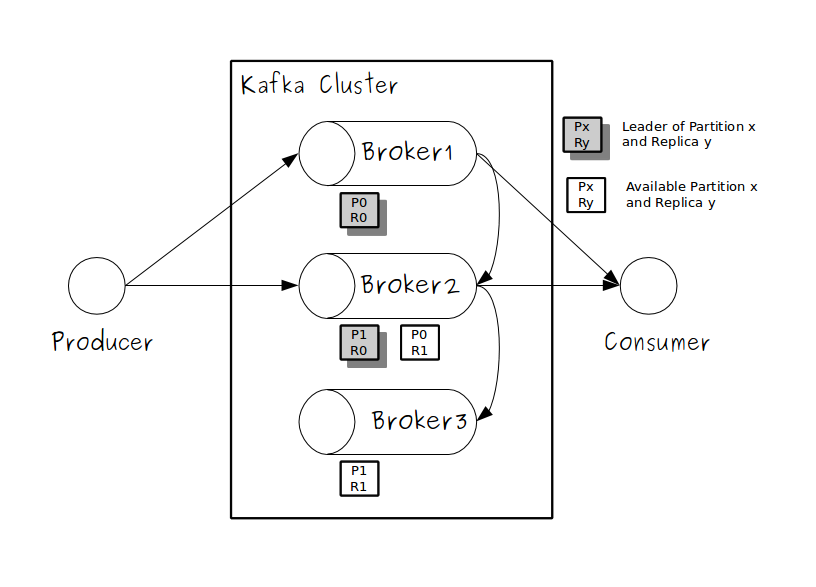
To expand the scenario, imagine a Kafka cluster with two brokers, housed in two machines. When you partitioned the demo topic, you would configure it to have two partitions and two replicas.
For this type of configuration, the Kafka server would assign the two partitions to the two brokers in your cluster.
Each broker would be the leader for one of the partitions.
When a producer published a message, it would go to the partition leader.
The leader would take the message and append it to the log file on the local machine.
The second broker would passively replicate that commit log to its own machine. If the partition leader went down, the second broker would become the new leader and start serving client requests.
In the same way, when a consumer sent a request to a partition, that request would go first to the partition leader, which would return the requested messages.
For this type of configuration, the Kafka server would assign the two partitions to the two brokers in your cluster.
Each broker would be the leader for one of the partitions.
When a producer published a message, it would go to the partition leader.
The leader would take the message and append it to the log file on the local machine.
The second broker would passively replicate that commit log to its own machine. If the partition leader went down, the second broker would become the new leader and start serving client requests.
In the same way, when a consumer sent a request to a partition, that request would go first to the partition leader, which would return the requested messages.
2. Active-Active

1. Scalability: In a system with just one partition, messages published to a topic are stored in a log file, Partitioning a topic lets you scale your system by storing messages on different machines in a cluster. If you wanted to store 30 gigabytes (GB) of messages for the Demo topic, for instance, you could build a Kafka cluster of three machines,each with 10 GB of disk space. Then you would configure the topic to have three partitions. which exists on a single machine.
The number of messages for a topic must fit into a single commit log file, and the size of messages stored can never be more than that machine's disk space.
2. Server-load balancing: Having multiple partitions lets you spread message requests across brokers. For example, If you had a topic that processed 1 million messages per second, you could divide it into 100 partitions and add 100 brokers to your cluster.
Each broker would be the leader for single partition, responsible for responding to just 10,000 client requests per second.
3. Consumer-load balancing: Similar to server-load balancing, hosting multiple consumers on different machine lets you spread the consumer load.
Let's say you wanted to consume 1 million messages per second from a topic with 100 partitions. You could create 100 consumers and run them in parallel.
The Kafka server would assign one partition to each of the consumers, and each consumer would process 10,000 messages in parallel.
Since Kafka assigns each partition to only one consumer, within the partition each message would be consumed in order.
Two partition two consumers under one user group
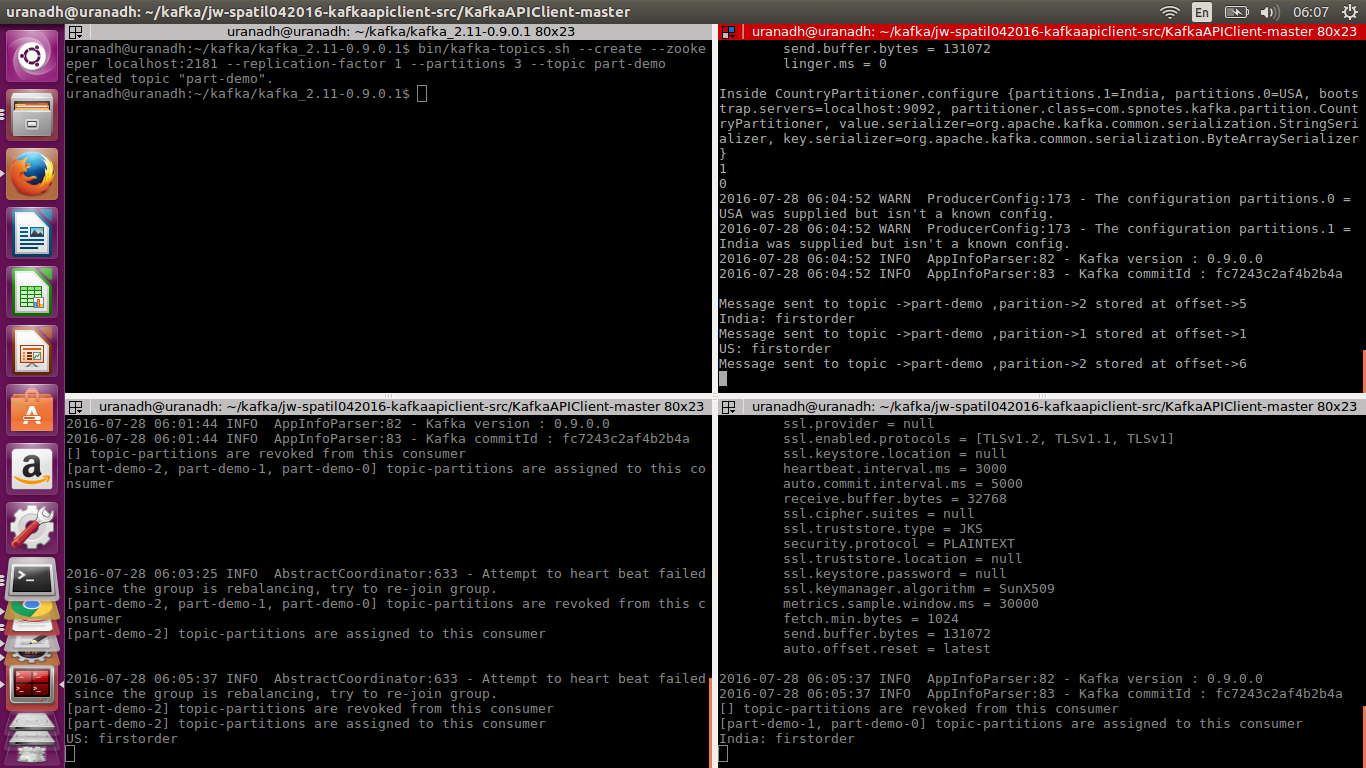
Two partition one producer three consumers under two user groups

Multi Threaded Consumer
Kafka Connect Architecture
Connector model
Worker model
Data model
Connector Model
A connector is defined by specifying a Connector class and configuration options to control what data is copied and how to format it.
Each Connector instance is responsible for defining and updating a set of Tasks that actually copy the data. Kafka Connect manages the Tasks;
the Connector is only responsible for generating the set of Tasks and indicating to the framework when they need to be updated.
Each Connector instance is responsible for defining and updating a set of Tasks that actually copy the data. Kafka Connect manages the Tasks;
the Connector is only responsible for generating the set of Tasks and indicating to the framework when they need to be updated.
Connectors do not perform any data copying themselves: their configuration describes the data to be copied,
and the Connector is responsible for breaking that job into a set of Tasks that can be distributed to workers.
and the Connector is responsible for breaking that job into a set of Tasks that can be distributed to workers.
Standalone mode

Distributed mode
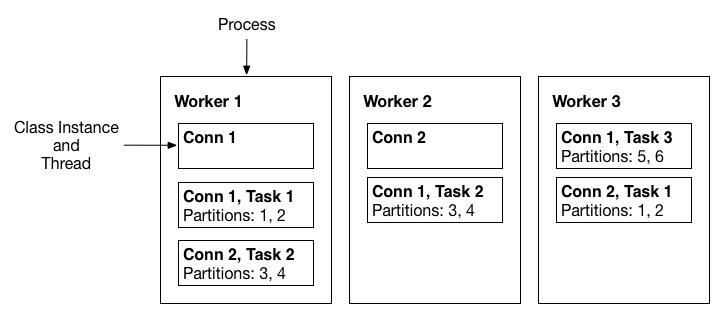
First, Kafka Connect performs broad copying by default by having users define jobs at the level of Connectors which then break the job into smaller Tasks.
It also provides one point of parallelism by requiring Connectors to immediately consider how their job can be broken down into subtasks, Finally, by specializing source and sink interfaces, Kafka Connect provides an accessible connector API that makes it very easy to implement connectors for a variety of systems.
It also provides one point of parallelism by requiring Connectors to immediately consider how their job can be broken down into subtasks, Finally, by specializing source and sink interfaces, Kafka Connect provides an accessible connector API that makes it very easy to implement connectors for a variety of systems.
Worker Model
each other to distribute work and provide scalability and fault tolerance. The Workers will distribute work among any available processes, but are not responsible for management of the processes; any process management strategy can be used for Workers (e.g. cluster management tools like YARN or Mesos, configuration management tools like Chef or Puppet, or direct management of process lifecycles).
The worker model allows Kafka Connect to scale to the application. It can run scaled down to a single worker process that also acts as its own coordinator, or in clustered mode where connectors and tasks are dynamically scheduled on workers.
However, it assumes very little about the process management of the workers, so it can easily run on a variety of cluster managers or using traditional service supervision.
Data Model
Each of these streams is an ordered set messages where each message has an associated offset
The message contents are represented by Connectors in a serialization-agnostic format, and Kafka Connect supports pluggable Converters for storing this data in a variety of serialization formats. Schemas are built-in, allowing important metadata about the format of messages to be propagated through complex data pipelines.
However, schema-free data can also be used when a schema is simply unavailable.
This allows Kafka Connect to focus only on copying data because a variety of stream processing tools are available to further process the data, which keeps Kafka Connect simple, both conceptually and in its implementation.
Kafka on Yarn (KOYA)
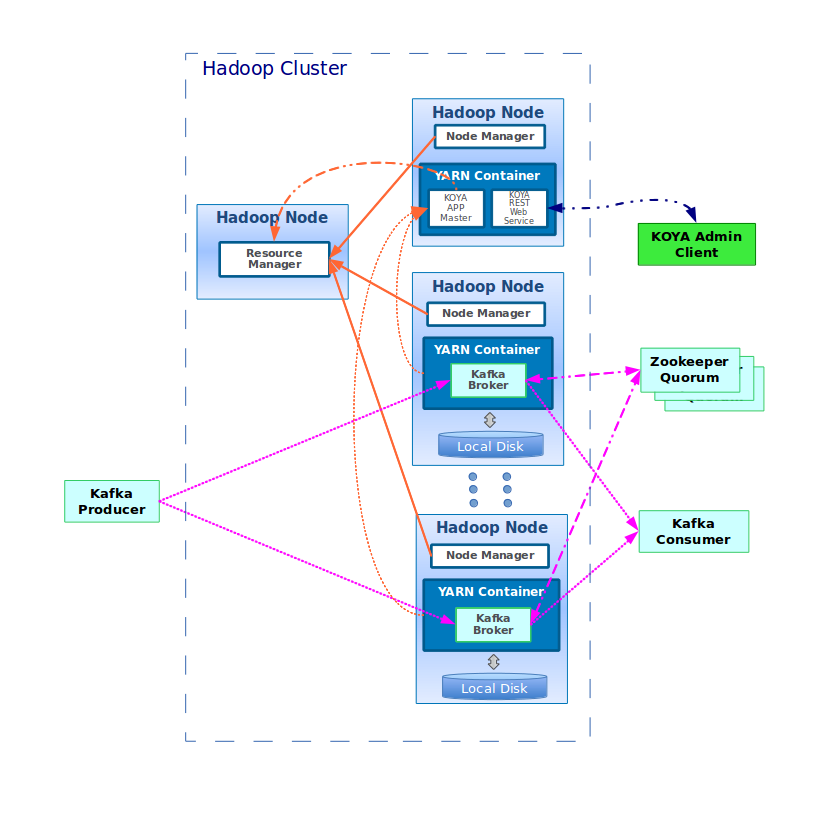
Why not confluent platform? It’s open source as well
Geo Redundancy
- Netflix Use case
2. Recommended approach (In same region)
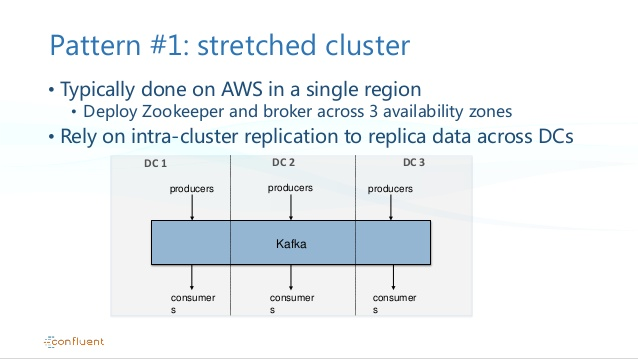
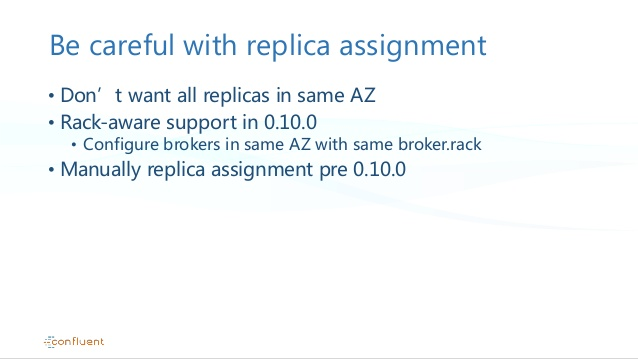
3. Best approach for Multi Region to avoid cycles
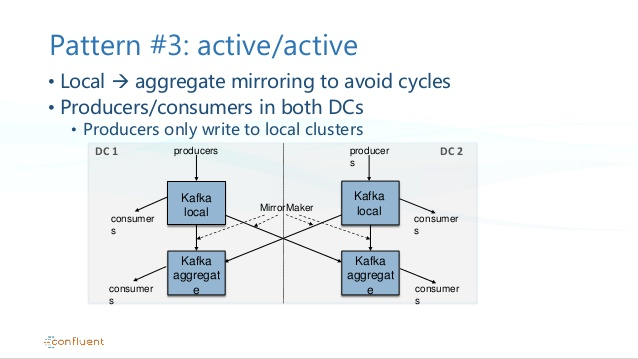
Mirror Message handling in Kafka to avoid cycling
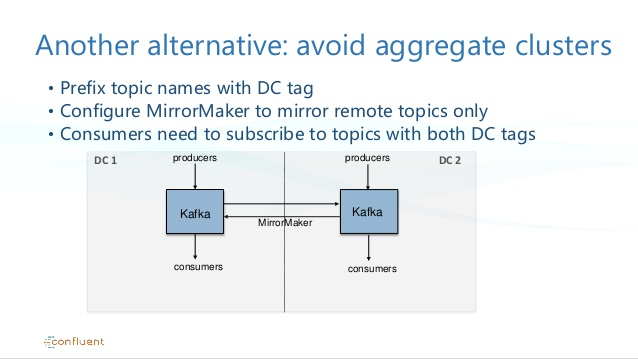
Master-Master replication
4. Kafka + ElasticSearch
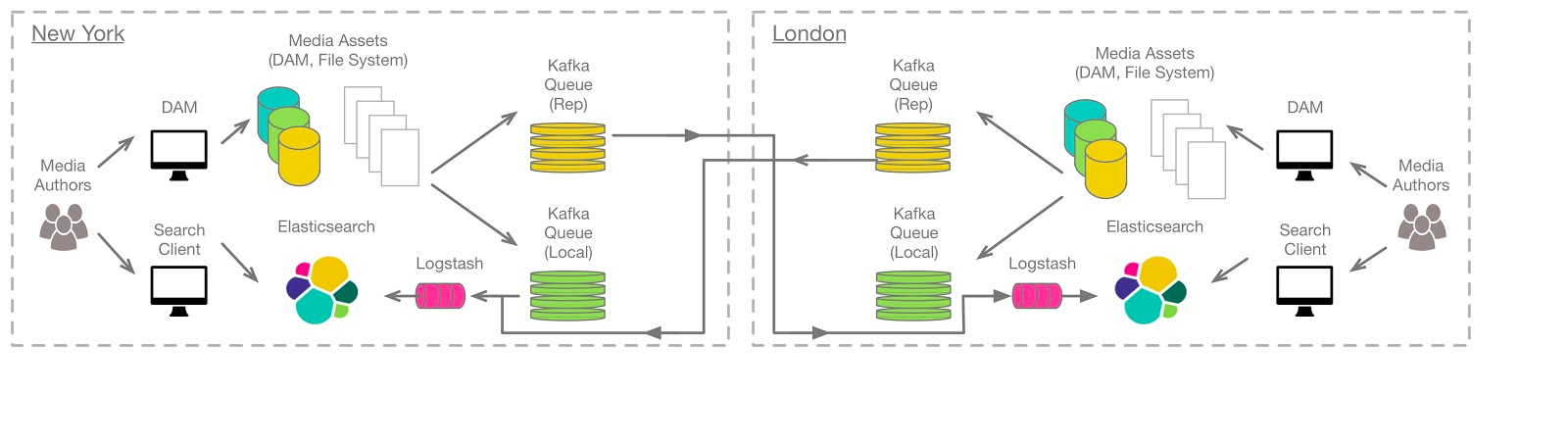
* Note: we can replace Logstash with Kafka Connect Sink Connector.
Mirror Maker
Important of mirror maker and improvements done with it
Some references
Message Handler sample
Kafka Messaging Semantics
Exactly one
Message compaction
Partitioning
Kafka tuning recommendation
Kafka Cluster
Kafka Cluster Deployment Recommendation
Dedicated Zookeeper
- Have a separate zookeeper cluster dedicated to Storm/Kafka operations. This will improve Storm/Kafka’s performance for writing offsets to Zookeeper,it will not be competing with HBase or other components for read/write access.
ZK on separate nodes from Kafka Broker
- Do Not Install zk nodes on the same node as kafka broker if you want optimal Kafka performance. Disk I/O both kafka and zk are disk I/O intensive.
Zookeeper recommendation:
Design Doc
Kafka Data Replication
Hard Problems